

-x-x-x- INTERNE FREIGABE -x-x-x-
RELEASE NOTES XRT5
Find all the necessary information on our latest releases on this page.
Version 3.4.0
February 2026
NEW FEATURES
Implementation of a new scoring method for the evaluation of tests
Previously the only available evaluation method for test modules was based on the signal detection theory processing an image as either correct or incorrect. This means that even if the set duration for a trial has run out and the user sees a white screen instead of the X-ray image, they still must give an answer (OK/NotOK).
It is now possible for administrators to set a different evaluation method for test modules which deems images that were not evaluated within the set time limit as ‘wrong’. Images are marked as ‘wrong’ when duration of either the trial or the module has run out. In case of the module duration has run out, all remaining images are set as ‘wrong’.
Whenever a user missed an image, they get an indication on the bottom right or their screen.
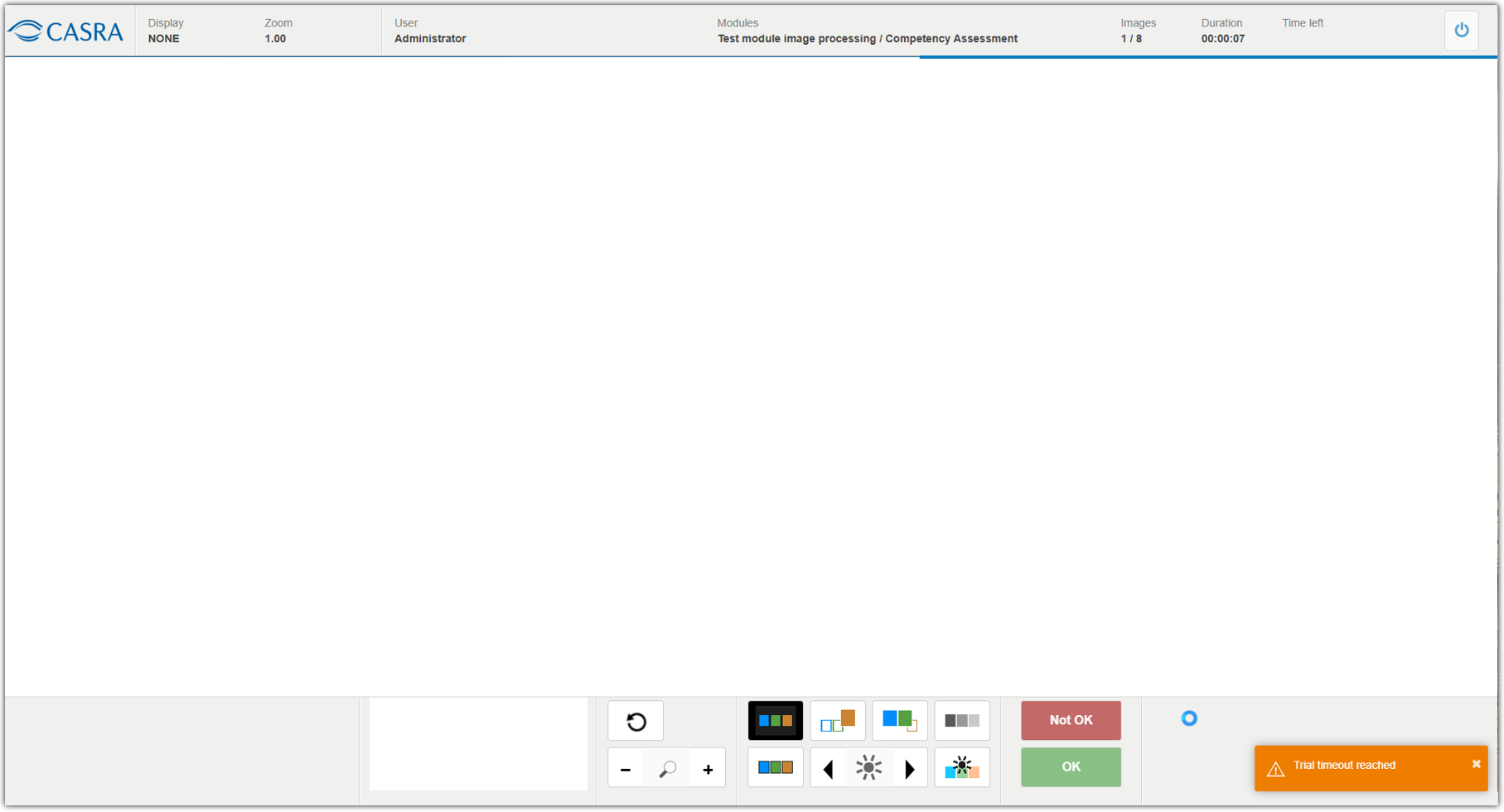
The results are displayed in the Image Test Result Detailed report. Example:

Module settings managed by administrators:
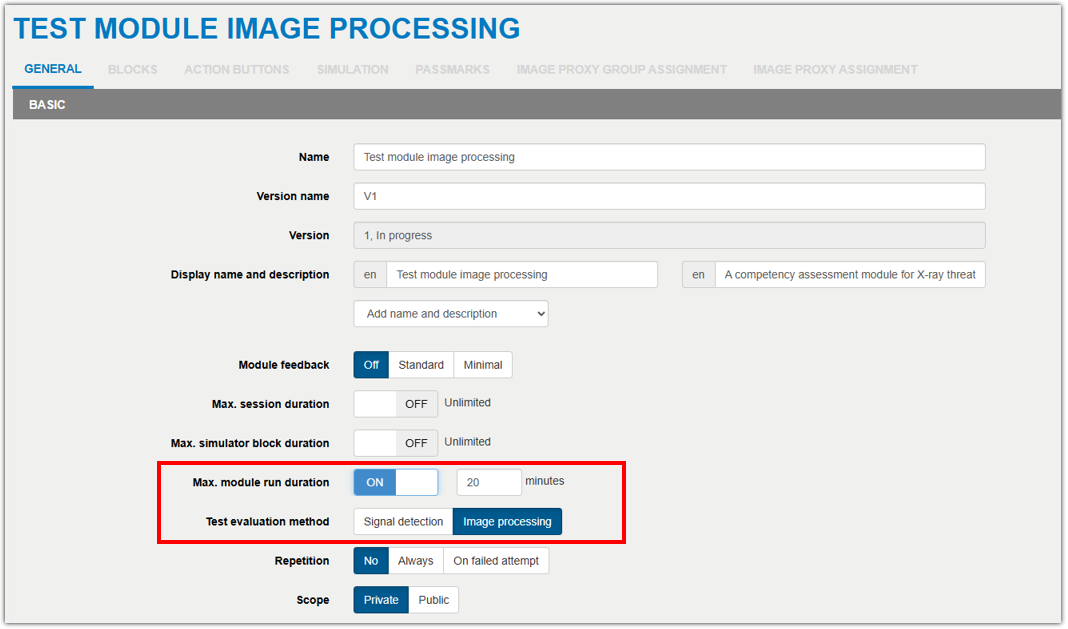
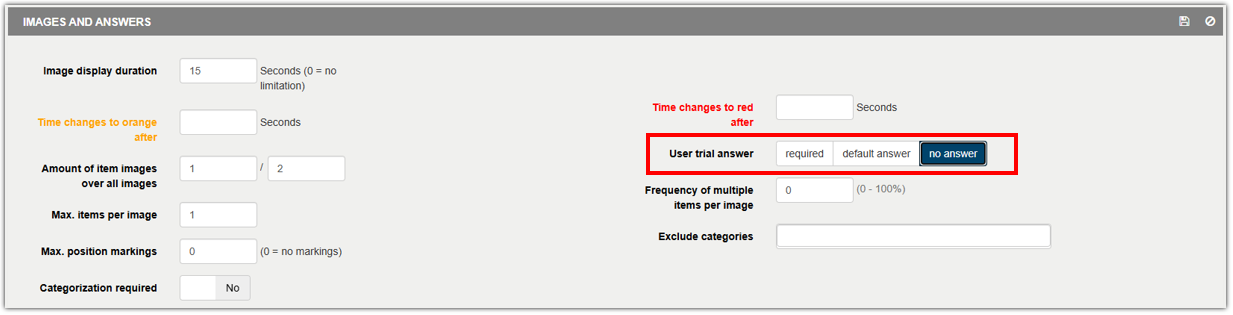
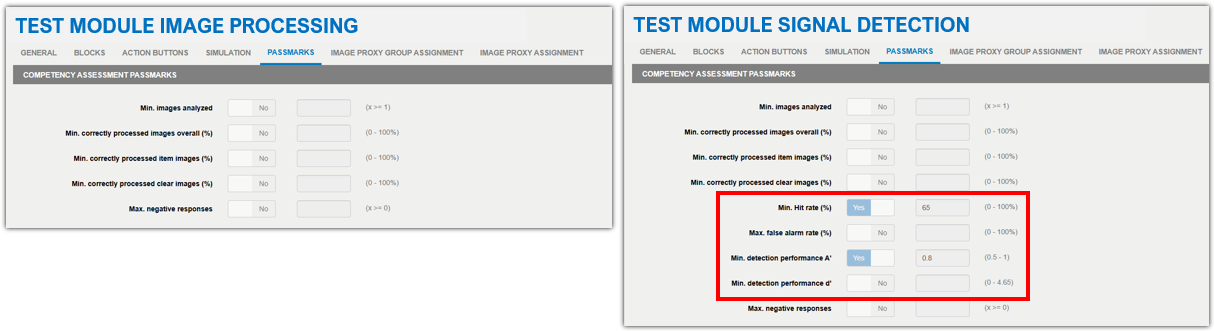
Differences between the two module types.
Left: news module type for image processing
Right: signal detection including the values for Hit rate, false alarm rate, A’ and d’
XRT help center
Previously, the XRT manual was managed using PDF help files uploaded to the HELP section in XRT. This was now converted to a secure but standardized documentation platform and is fully integrated into XRT.
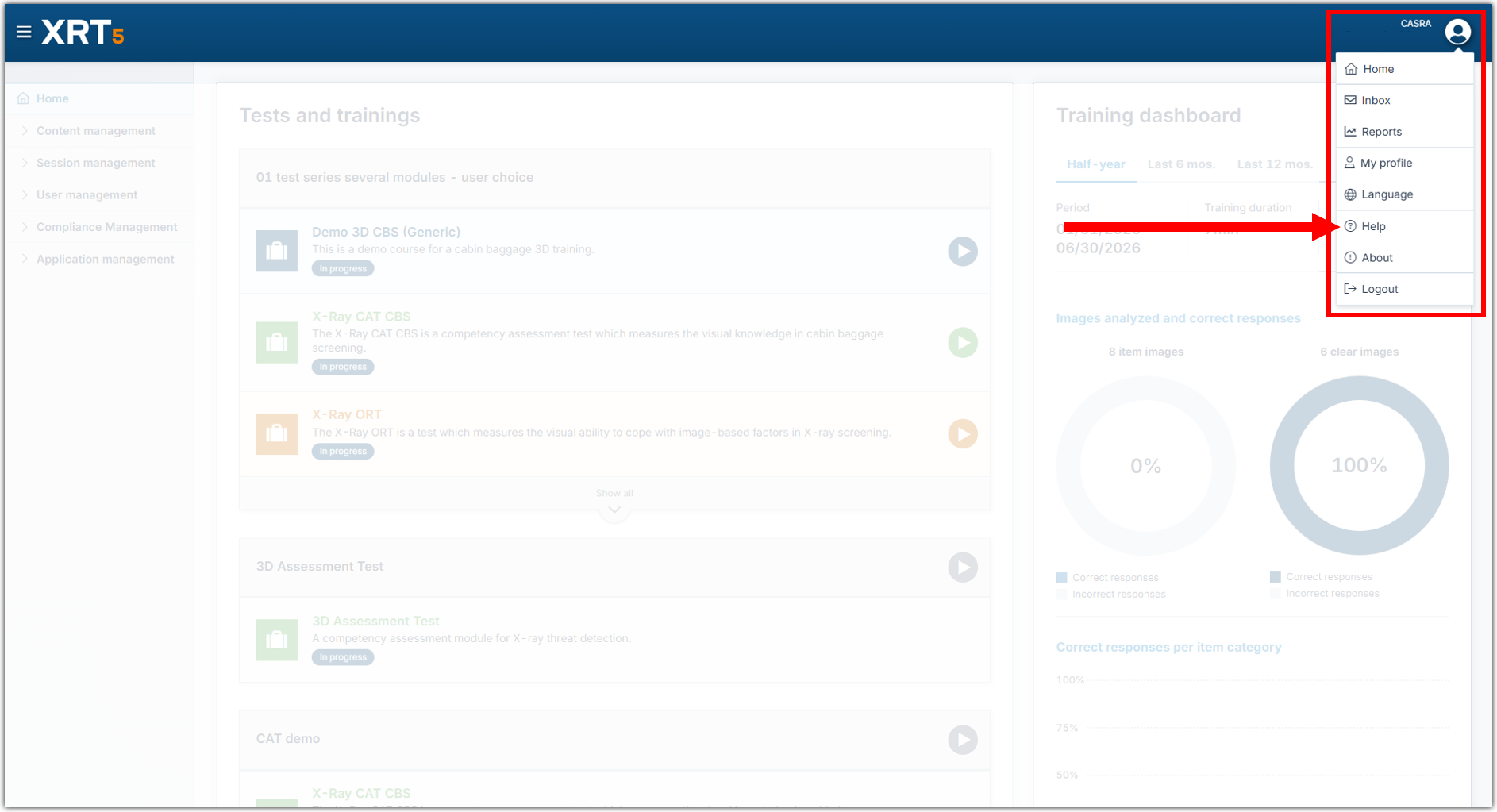
Using the user menu, simply navigate to Help to reach the documentation.
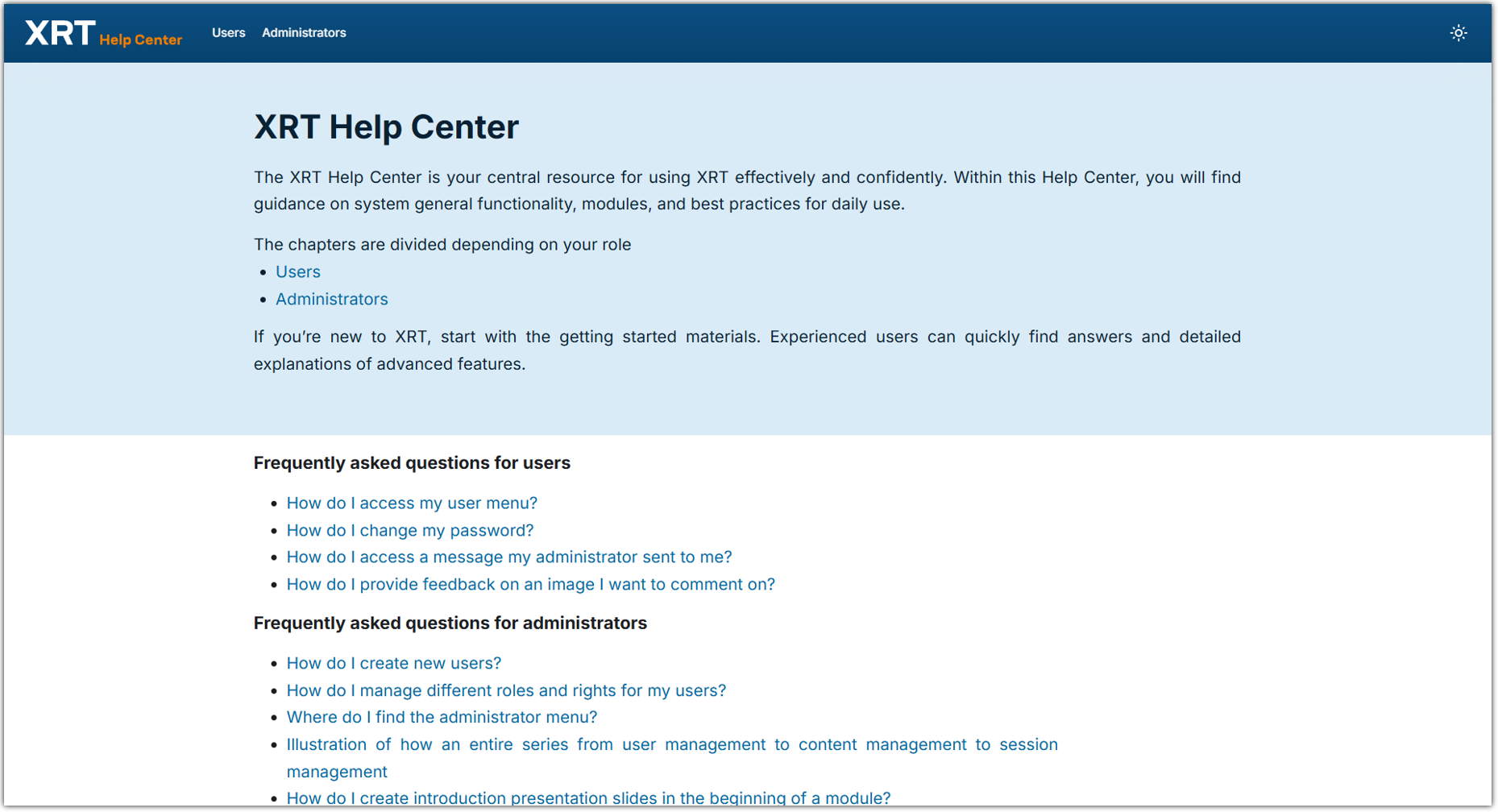
On the homepage you find an FAQ section directing you to specific articles in the XRT manual.
Feel free to get in touch with customerrelations@casra.ch if you’d like to see more questions on the homepage. We will update it gradually and include new features and changes with every new version of XRT.
In case you’d like to use the documentation in a different language, simply use the translate function in your browser.

IMPROVEMENTS AND BUG FIXES
List of new or improved features and bug fixes that have not yet been mentioned in detail above.
NEW
- Scope limitations have been added to the compliance management.
IMPROVED
- The user purging has been improved further.
- The series start button has been disabled after starting a series to prevent an additional series.
- The CASRA data protection form is not set as the default anymore for organizations.
- The infosheet popup in the trial feedback have now a maximum height to fit all the screen sizes and titles have been made dynamic to always fit within the popup.
- The rights of the admin role has been adapted in regards to the visibility of the compliance management feature.
- The labels for the session feedback as well as the course feedback have been adapted for a better differentiation.
- When updating image pools, independently made customer copies will now automatically also be updated.
BUG FIXES
- A rounding error bug has been fixed in the Image Test Result Summary report.
- A bug has been fixed in the compliance management where missing values were added in the certification definition.
- A bug has been fixed in the compliance management where various translations have been added.
- A bug has been fixed where the filter was broken when filtering a high number of modules.
- Series names and description are now localized to the user’s language on home.
- A bug has been fixed where incorrect images in the user trial feedback infosheet were displayed.
- A bug has been fixed where the color of the module on the home screen was incorrect.
- A bug has been fixed in the trial feedbacks showing the incorrect answer.
Release 3.3.0 and 3.3.1
November 2025
Relaunch of Smiths Detection user interface for 3D CBS simulator
The 3D simulator for the Smiths Detection user interface has been part of XRT for over 8 years. Due to technological advances and various feedback, we took it upon ourselves to completely relaunch the simulator. The main focus lies on the image quality that now reflects the one from the machine in a much better quality. The coloring and behavior is as closely as possibly mirrored to the machines due to a specifically developed 3D edge enhancement and an image shader functionality that is based on the coloring of the CTiX machine. Meanwhile the UI itself still reflects XRT5’s design and fits in seamlessly with the rest of the software. There were no changes made to any of the data, meaning no training data was lost and there is no change in the reports. All the modules now run on the new UI. There is no action required from either the user or administrators.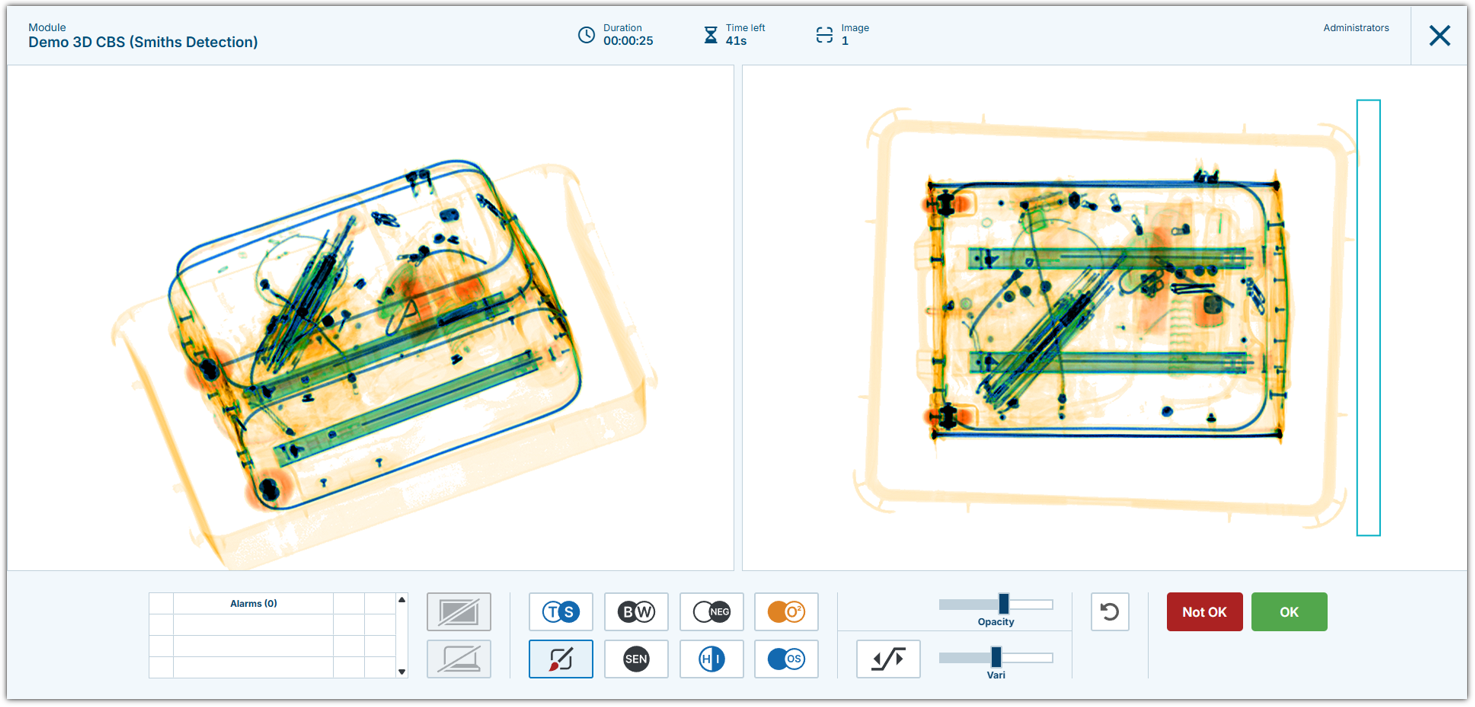
The new 3D Smiths Detection UI in the XRT simulator, here showing CBS content.
Launch of the Vanderlande user interface
Alongside the technological advancements implemented for the Smiths Detection 3D simulator, we also launched a new user interface showing the Vanderlande design. This simulator was developed with the collaboration of the manufacturer to project as close a result as possible. It is also based on the latest technological standards and aligns seamlessly with the XRT5 design. It is available for Expert users and can be used alongside the other simulators. Should you be interested in a demonstration or if you require assistance in setting up your own modules, please don’t hesitate to reach out to our customer service (customerrelations@casra.ch).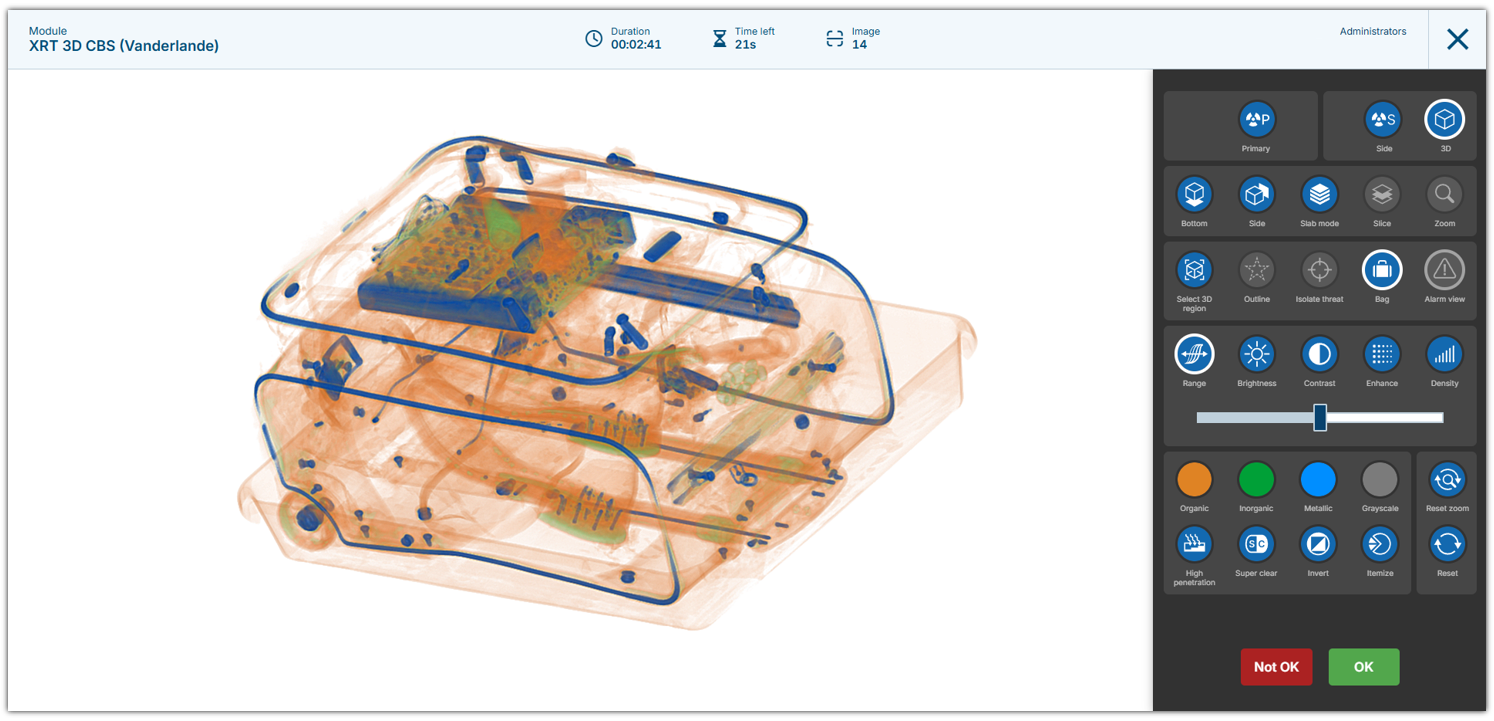
3D view of a CBS container displayed in the Vanderlande user interface.
Training time dashboard on the home screen
There is a new dashboard available on the home screen for every user to show different sets of data of their individual training times. In the administrators navigation menu there is a new entry point “Compliance management”. In there, specific training conditions can be set up according to your compliance regulations. To create a new training time condition you set a title, select the range (year, half-year, quarter, month), an equal or smaller interval (year, half-year, quarter, month), the target training time in minutes and the reference point of when it should start (calendar, current date or the certification validity). Simply assign a training condition to the respective user group and it will show up on their dashboard. This assures that all users see at one glance if they are within the regulations. 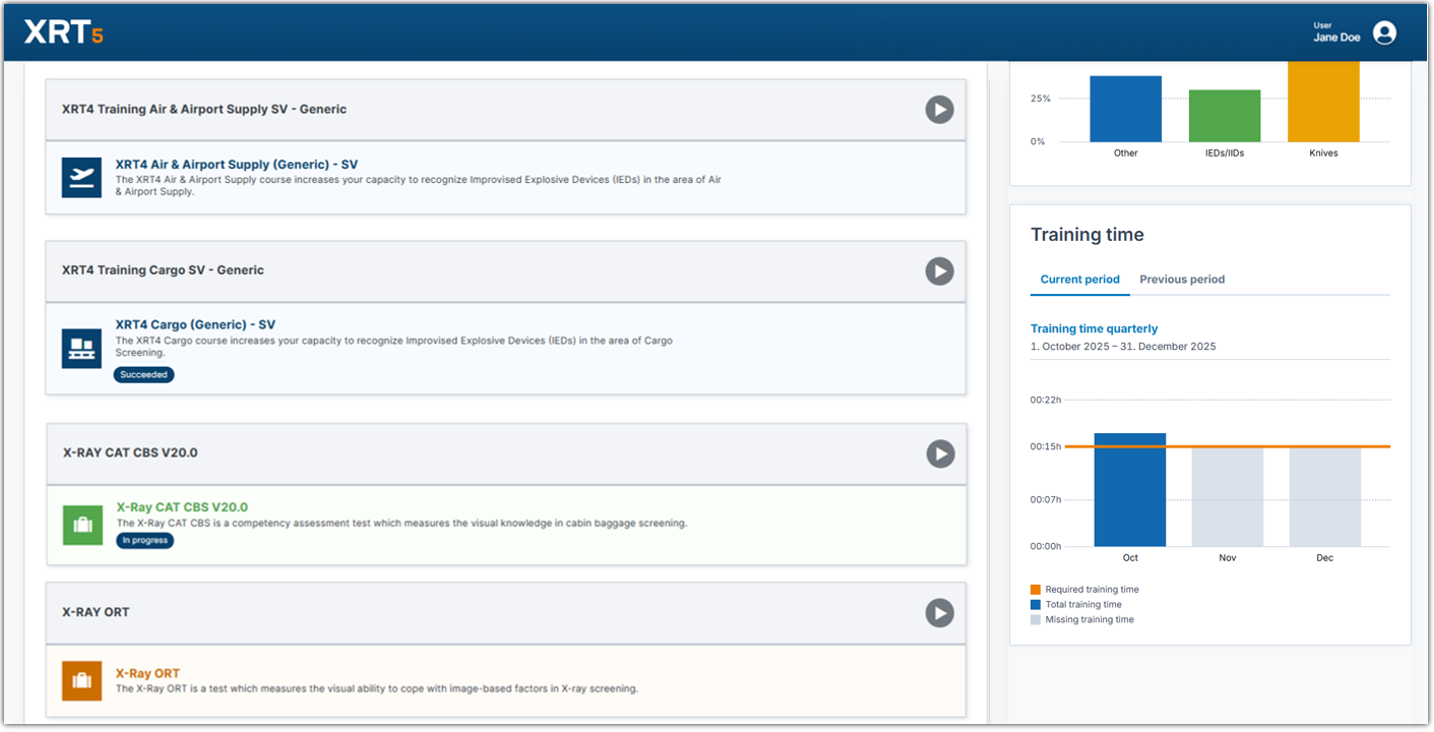
Training time dashboard on the home screen
Training reports within the compliance management
The set training conditions in the compliance management can be viewed by administrators in the specific training report. Unlike the other reports that can be found in the user menu, the training report is located in the compliance management and only accessible to administrators. The data is dynamically calculated based on the defined training conditions. The data displayed shows with calculated differences where users are missing training time. Each training condition has its own report. They can be exported in either Excel or PDF format. 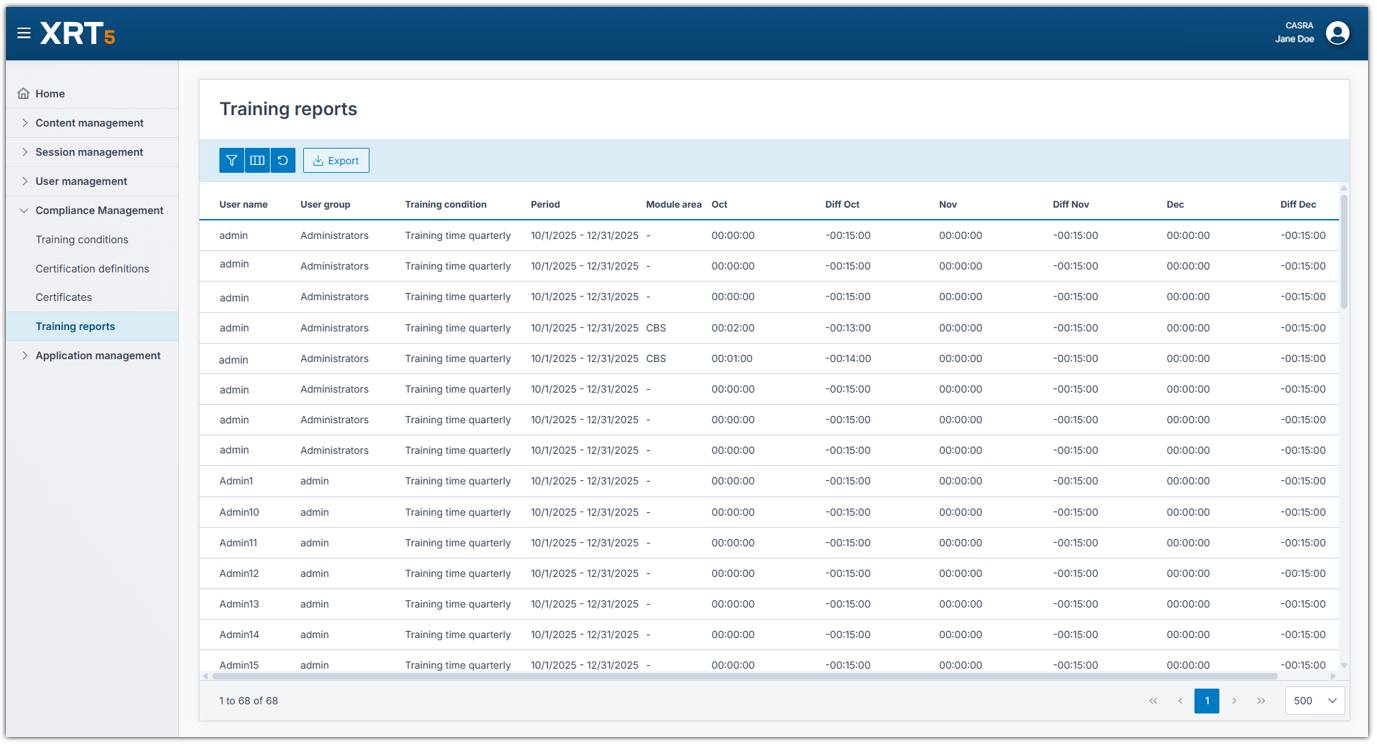
Training time report with customized data set, corresponding to the dashboard on the home screen.
Certification creation in the compliance management
Based on the set training conditions, certifications can be defined and issued. The certificates can be directly linked to a document template. This then allows the administrator to download either .docx or .pdf files that have been previously designed with a corporate-issued layout.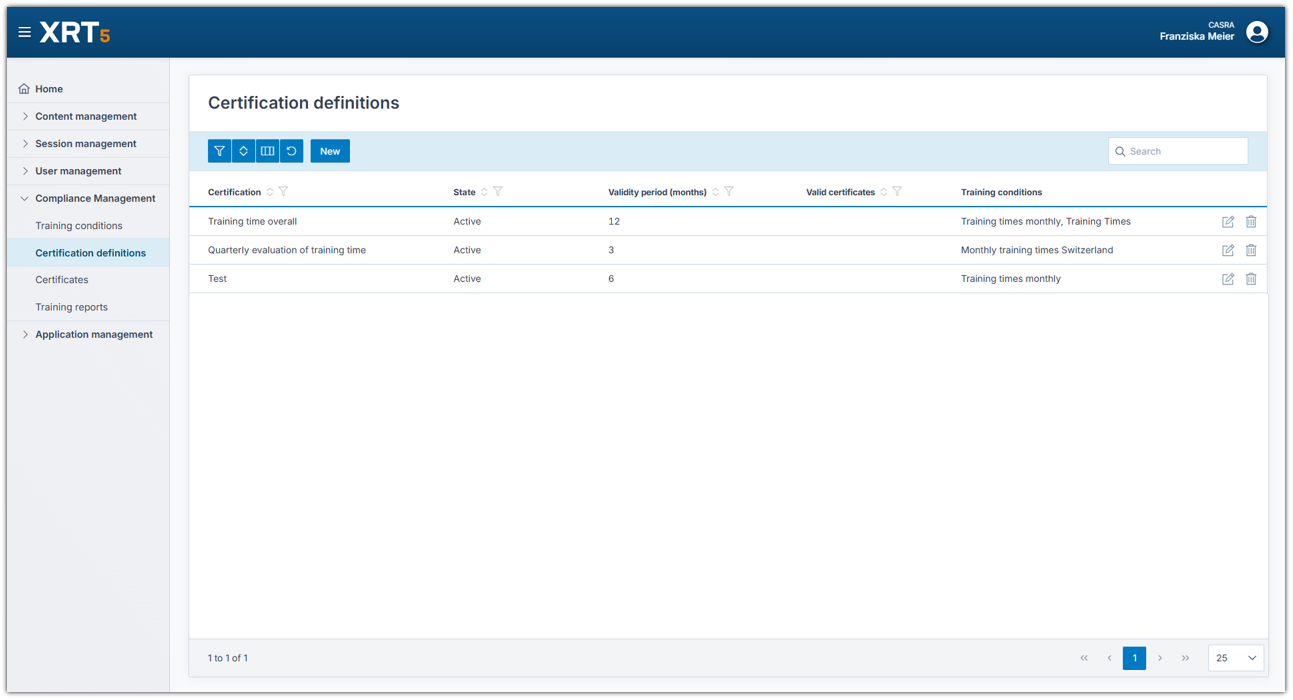
Certification definitions set up in the compliance management.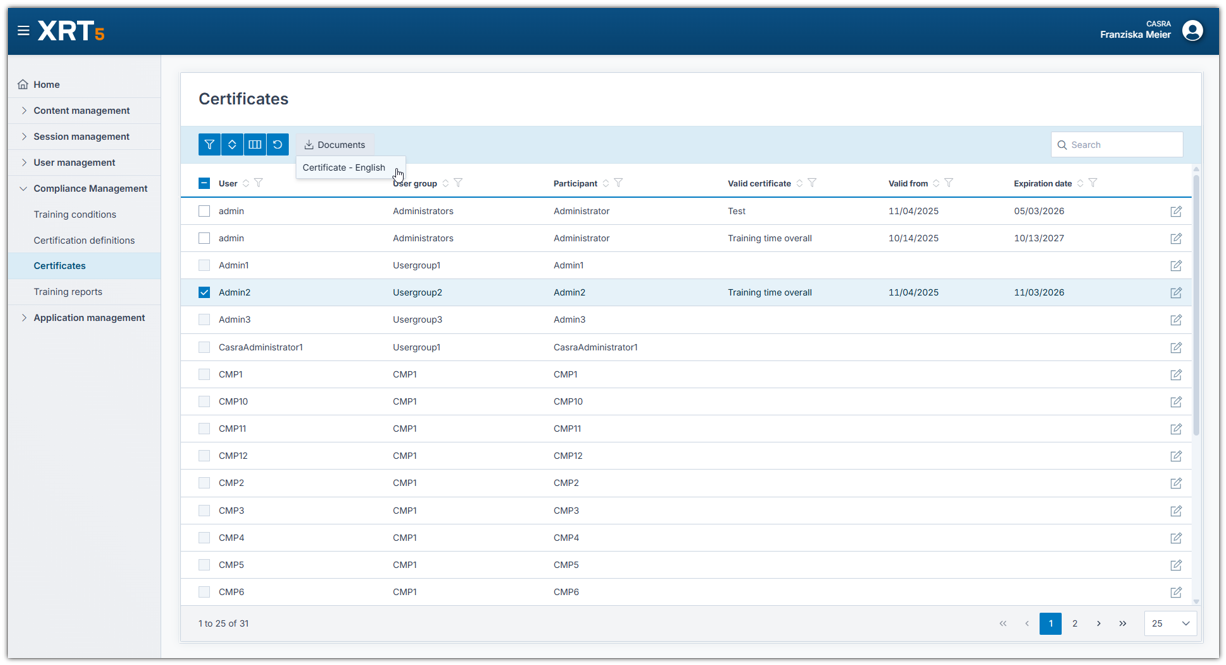
Certificates interface where a document can be downloaded.
Improvements and Bug Fixes
NEW
– Relaunch of Smiths Detection 3D simulator
– Vanderlande 3D simulator
– Compliance management
IMPROVED
– DICOS and UFF formats are now supported in the image import function. The import is limited to specific machine types. Please get in touch with customerrelations@casra.ch if you have a specific question about importing certain images of a previously not supported format.
– The filter of the Theoretical Course Summary report has been adapted to not include obsolete level attempts anymore.
– The dashboard has been improved, now being able to display more categories at once and using the color scheme of XRT5.
– The theoretical block feature was improved in the background to run more smoothly and predictably.
3.3.1
– The training time report performance has been improved significantly.
– Stability issues were fixed in the new simulators.
– Position marking placement was improved in the new simulators.
BUG FIXES
– A bug has been fixed where the trial category filter on a block didn’t work on not assigned trials.
Release 3.2.0 and 3.2.1
Document generation
This feature is a new addition to our product. Standard templates for the three reports “Training time”, “Image test result summary” and “Theoretical course summary” are now available. They can be downloaded as Doc Word files and styled and designed as required using the data fields provided. For example a corporate font along with logos, signatures and other authority-issued layouts can be designed. These customized standard templates are uploaded to XRT. In the respective reports, selected sets of data can be printed as neatly designed documents in either Word Doc or PDF format. This feature can be used completely independently: you can download the standard templates themselves and design them according to their requirements. However, if there are complicated documents to be created, i.e. including calculations of different fields, please don’t hesitate to get in touch so we can help you setting them up. If you want to use this feature, please get in touch with customer relations and sales (customerrelations@casra.ch). It’s a paid feature and it will not be active by default.
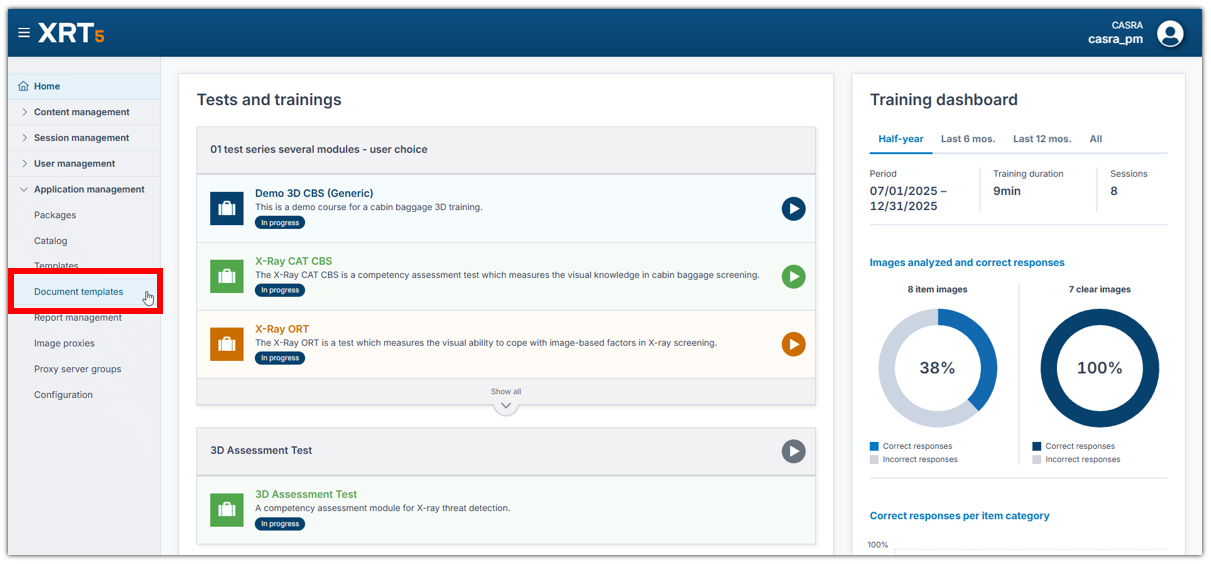
Extended administrator navigation on the left including the document templates.

Generate (and download) the document after selecting the date. You can select multiple rows. There will be one document each printed for each set of data.
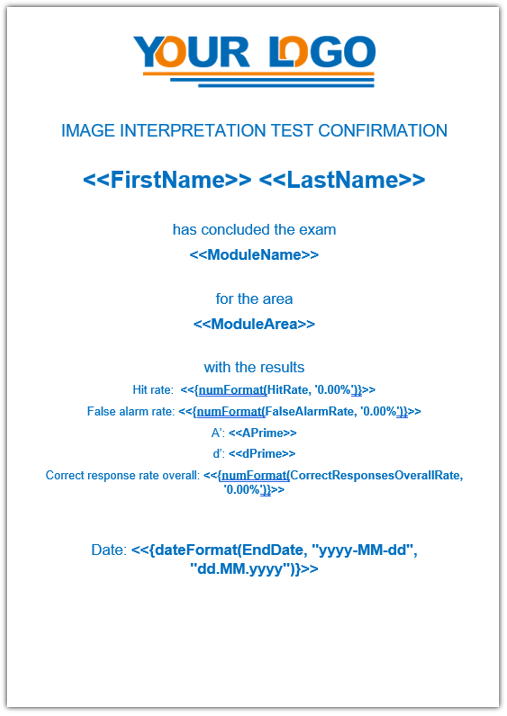
Standard template displaying the available data fields for the Image Test Result Summary report.
Improvements and Bug Fixes
NEW
– Deletion of content: unused contents can now be deleted. This saves storage space for unused data, but is uniquely available to CASRA. Local installation customers should get in touch with should they be interested in using this feature. For the organizations on hosted/solution: the clean-up was part of the release.
– Additions to the infoboard message browser: a filter for ‘currently valid’ messages has been added, as well as now only the messages assigned to the user’s organization are shown.
– The category “IEDs” is now called “IEDs/IIDs”.
– 4 (optional) columns have been added to “Performance per category” report: images analyzed, % correct responses overall, % correct responses item images, % correct responses clear images
IMPROVED
– The create series popup is now translated.
– There is now a warning message for series deletion displayed.
– To exclude categories is now handled as the other module settings and is not limited to just blocks anymore.
– The manifest tab on the container is now always displayed regardless of the area.
– In the series browser the filter default has been changed from “all” to “active”.
BUG FIXES
– Several small bugs have been fixed in the Analogic simulator.
– A bug has been fixed where the basic section of information in a user group was only displayed in the organization, not the suborganization.
– A bug has been fixed where the frame resolution buttons aren’t blocked anymore when the display duration on a trial is over.
– A bug has been fixed where there was an issue when logging in using the Active Directory.
– A bug has been fixed where the column order in the UI of a report did not match the export.
Release 3.1.0
March 2025
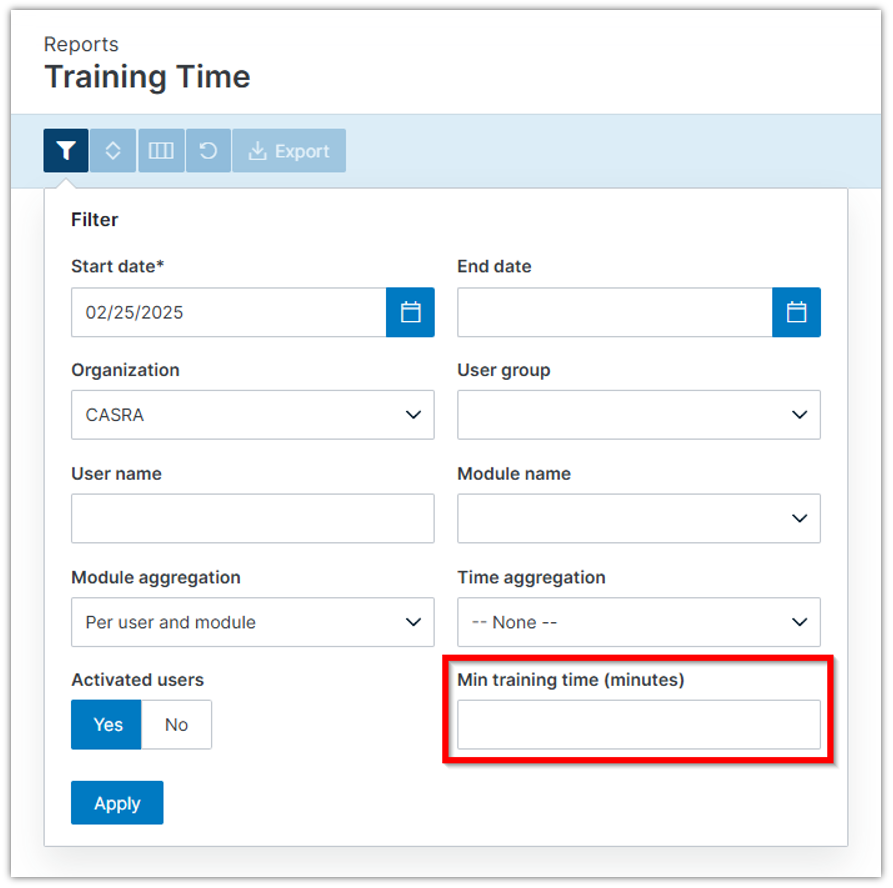
Extended filter in the training time report
The filter in the training time report was extended with the option to add a value for the minimal training time. This allows administrators to filter out short training sessions that should not be part of the reporting.The filter is dynamic and the minimal training time can be set individually every time a report is issued.
Histogram functionality in Leidos simulator
The histogram functionality was integrated as an additional image enhancement in the Leidos simulator. The button is always visible in the simulator. It can be activated by first enabling the grayscale mode (black-and-white image) and then clicking the histogram button on the bottom right. Currently the functionality is a static default value that is applied on the 2D image on the right side of the screen.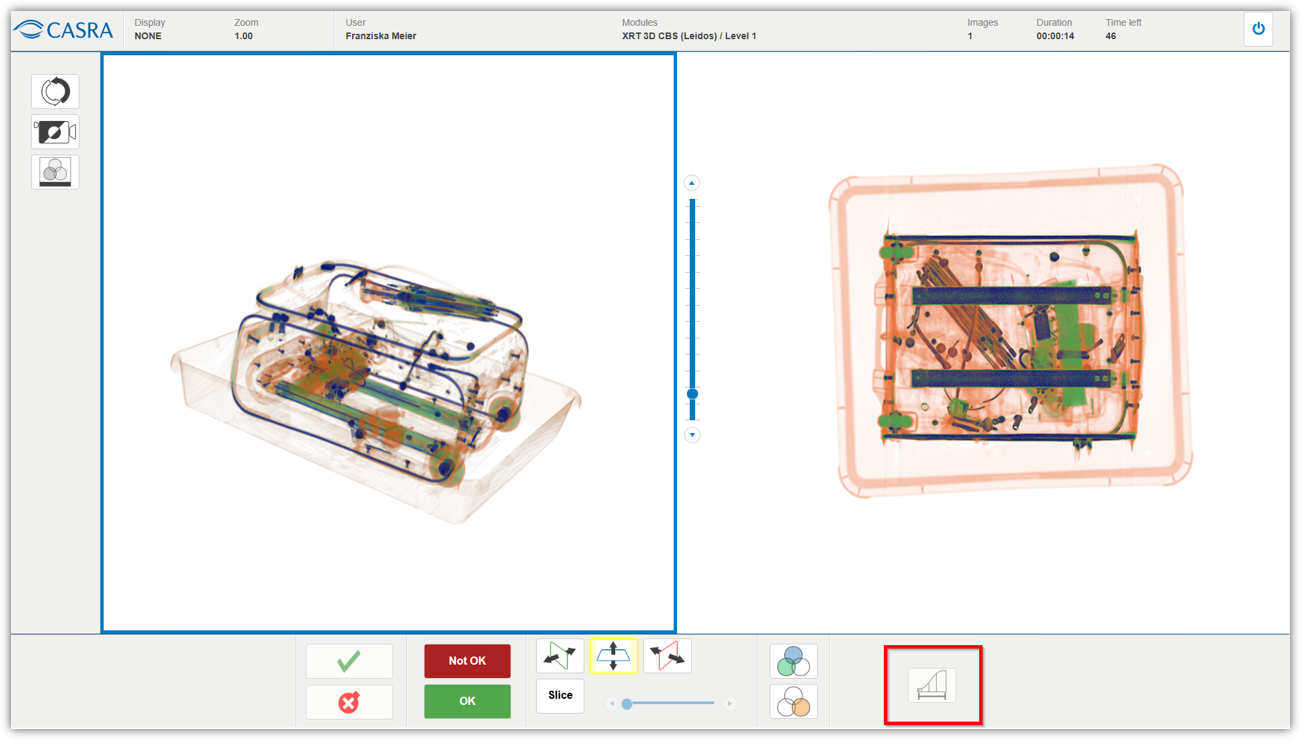
Leidos simulator with the histogram functionality on the bottom right.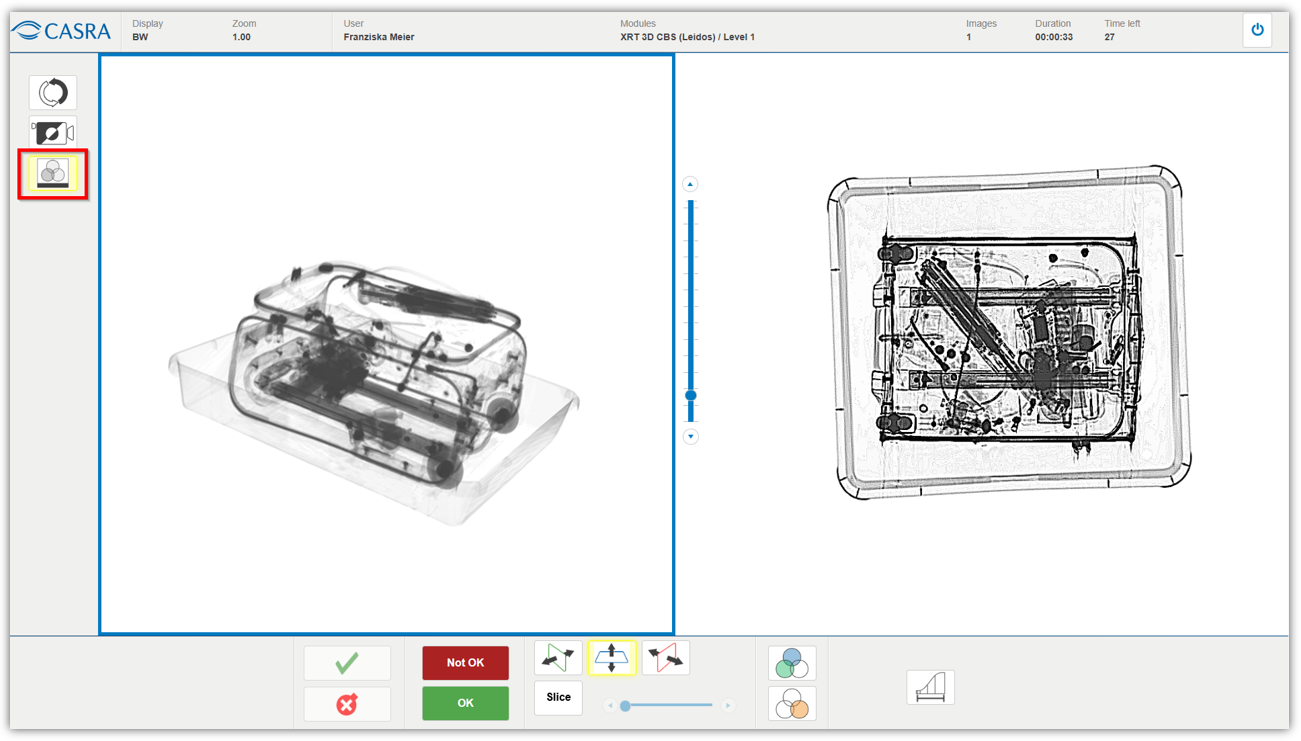
Grayscale image in the Leidos simulator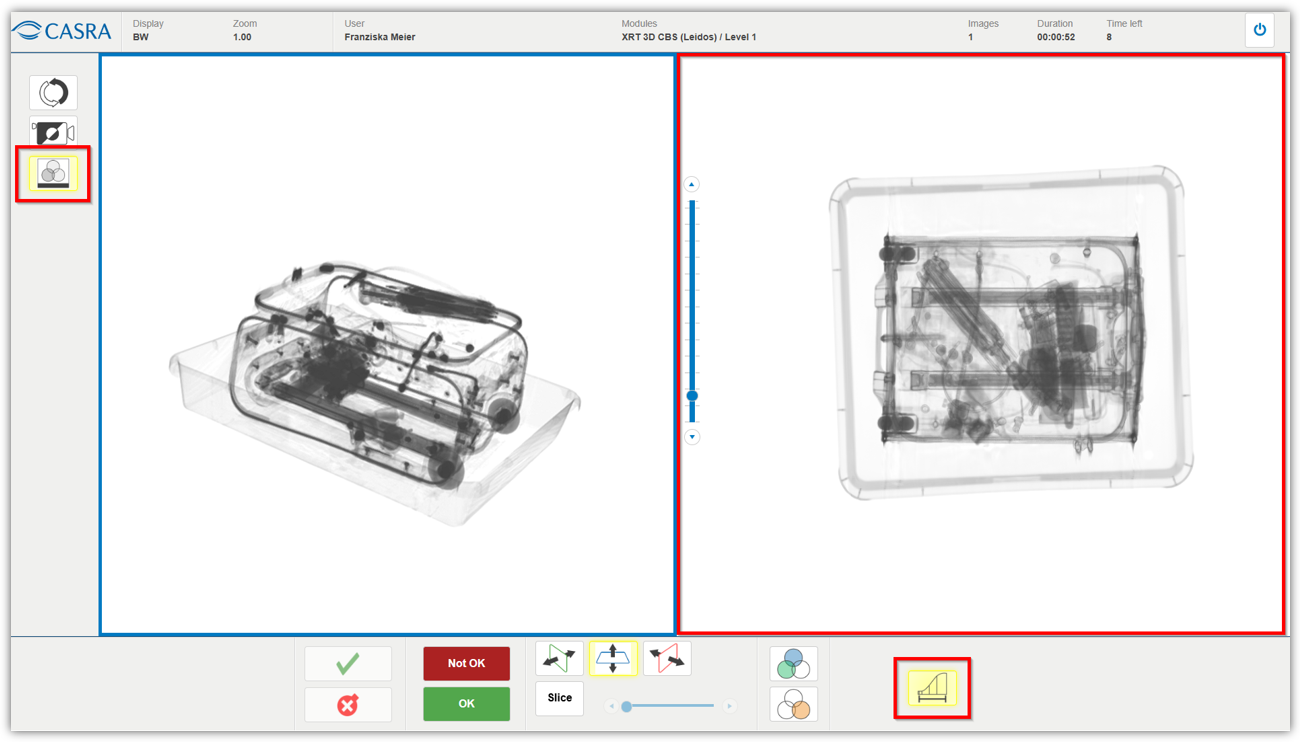
Leidos simulator with the histogram functionality enabled, adapting the image on the right side.
Improvements and Bug Fixes
NEW
– The Analogic simulator is now fully translated
IMPROVED
– The organization default is now saved for a longer period of time on the login screen than before, which makes it easier to log in again.
– The “new version update” information on the login screen has been removed after updating to XRT5 back in December 2024.
– The theoretical course summary report was improved as the “min score” value was incorrectly displayed at times.
– The dashboard display was improved so that columns visible for several categories don’t overlap anymore.
– The filter in the restrict access tab in the report management now works with upper and lower case characters.
BUG FIXES
– A bug has been fixed where long error messages were incorrectly placed in the user interface.
– A bug has been fixed where the sorting in reports was not working after the recent update to XRT5.
– A bug has been fixed where the error toaster message “Maximum allowed concurrent sessions reached” only popped up for a short time.
– A bug has been fixed where trials were not correctly evaluated in modules with categorization without position marking.
Release 3.0.0 - 3.0.4
January 2025
Product relaunch: New and enhanced user interface
A refreshed user experience has been introduced in the latest version of the X-Ray Tutor. With a completely redesigned interface, it is now presented in contemporary design. Navigating and accessing your tools is now more intuitive and efficient than ever.
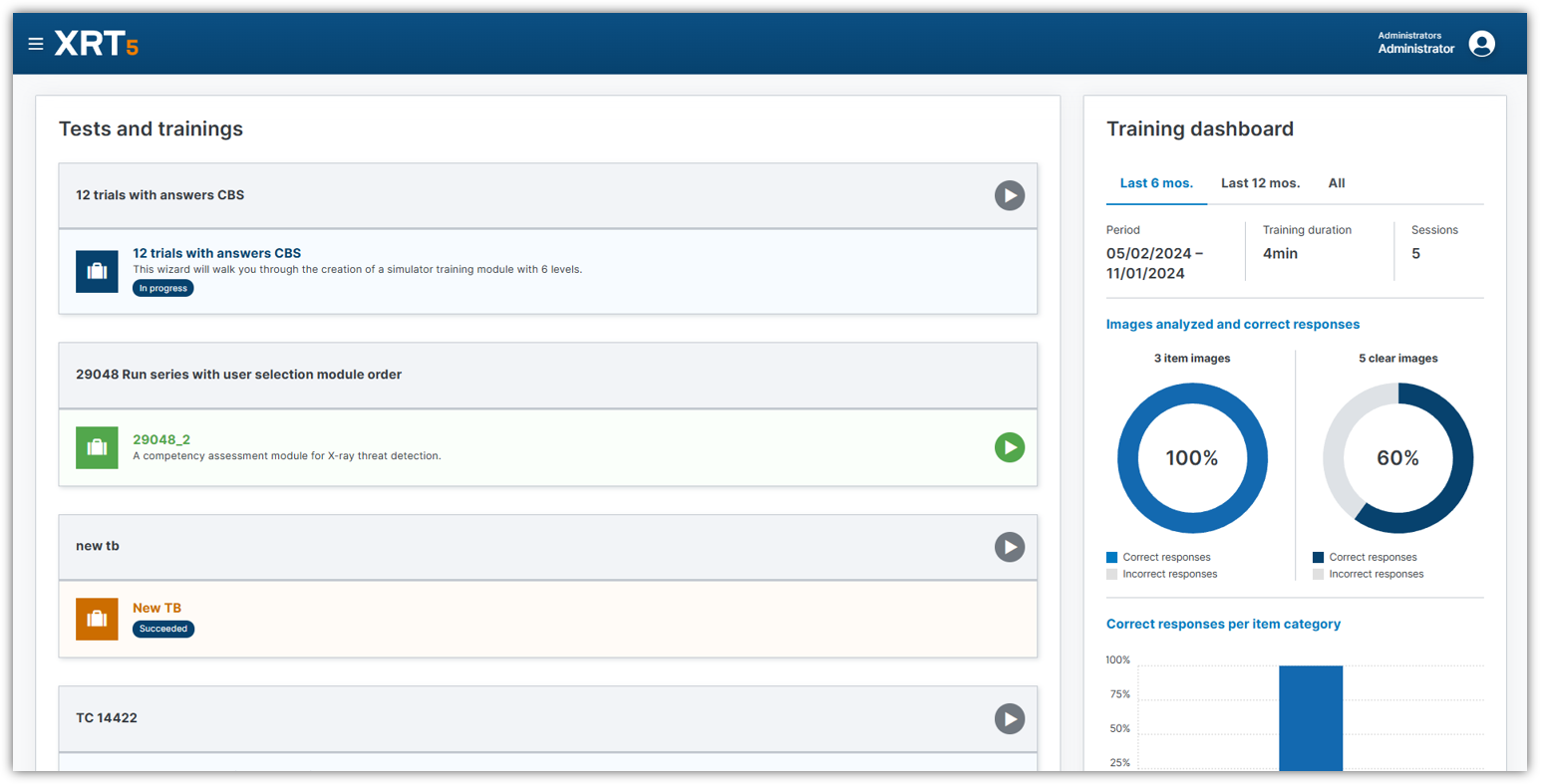
Home screen as it is presented to the user in the new design
New UI features for all users and admins
This first iteration mainly deals with the USER PART of the application. The new UI offers an improved experience in the following sections:
– Login/logout process
– Header with user menu
– Side navigation for users and administrators
– Module display and the dashboard on home page
– Language selection
– About, Help and My profile sections
– Message inbox
– Reports
Login screen

Header with the administration and user menu
The new design moves the user profile and all accessible pages from the left side to the right side. The menu opens by clicking on either the user name or the profile icon.
The administrator menu stays on the top left side and opens by clicking on the hamburger-menu. The vertical menu bar can be hidden again by clicking the menu icon once more. The entries (content management, session management, infoboard, user management, report management and application management) can individually be collapsed or opened up to the user’s liking by clicking the arrow icon.
Home screen with module display and dashboard
This view has not changed apart from the look and feel of it.
Users still see the TESTS and TRAININGS available to them on the left and the training dashboard on the right.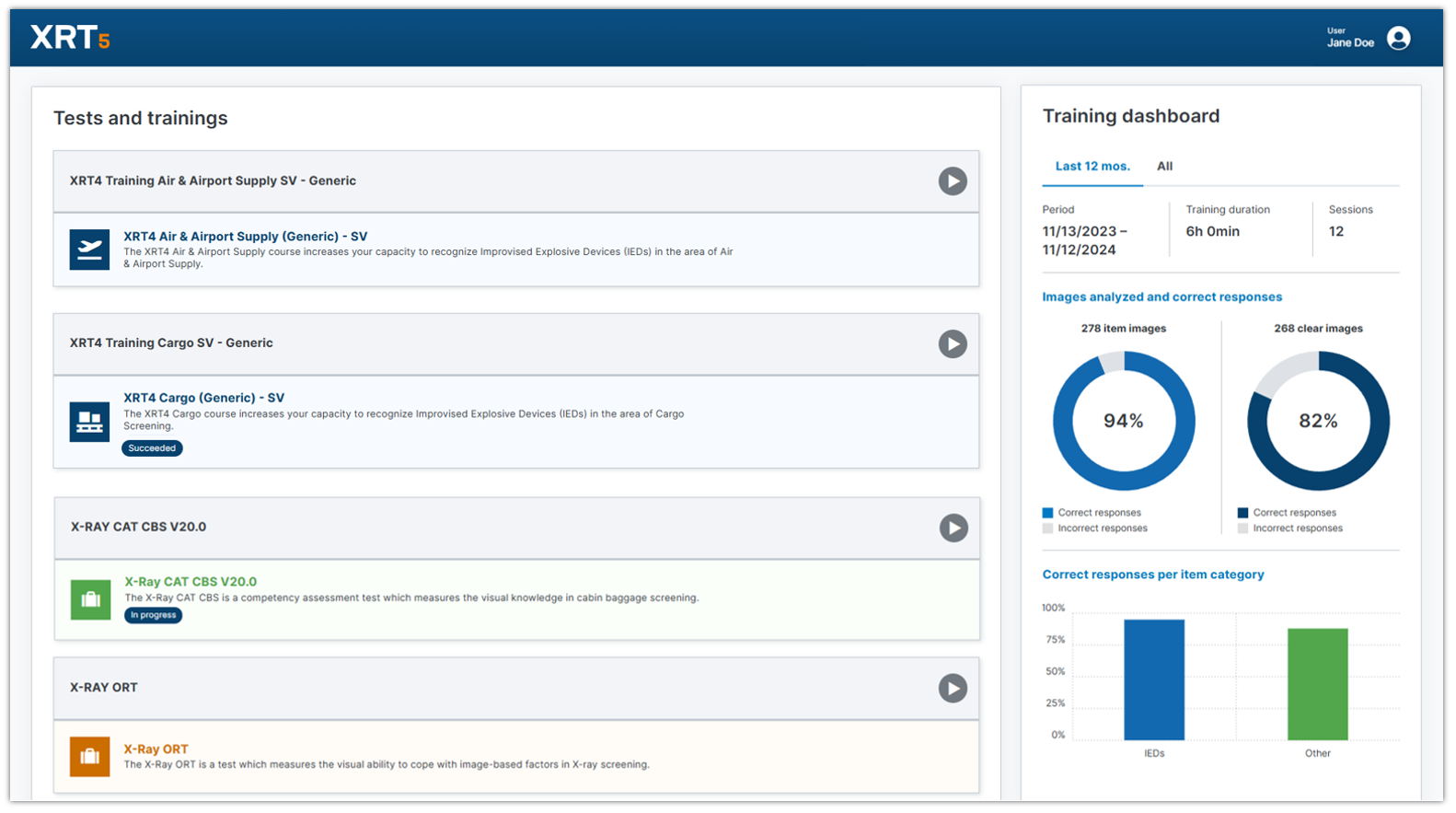
Language settings
Users can set their preferred language on the login screen when entering their credentials. If they ever want to change the language, this can be done with a simple click in the user menu.
There are currently over 15 languages available. Among them are English, German, French, Spanish, Italian, Hindi, Arabic, Russian and various others.
Help section
Various quick guides, how-to and the entire user manual are available in several different languages.
Inbox
The messaging service is available to all users to receive important information from either their supervisors or cross-organizational information directly from CASRA.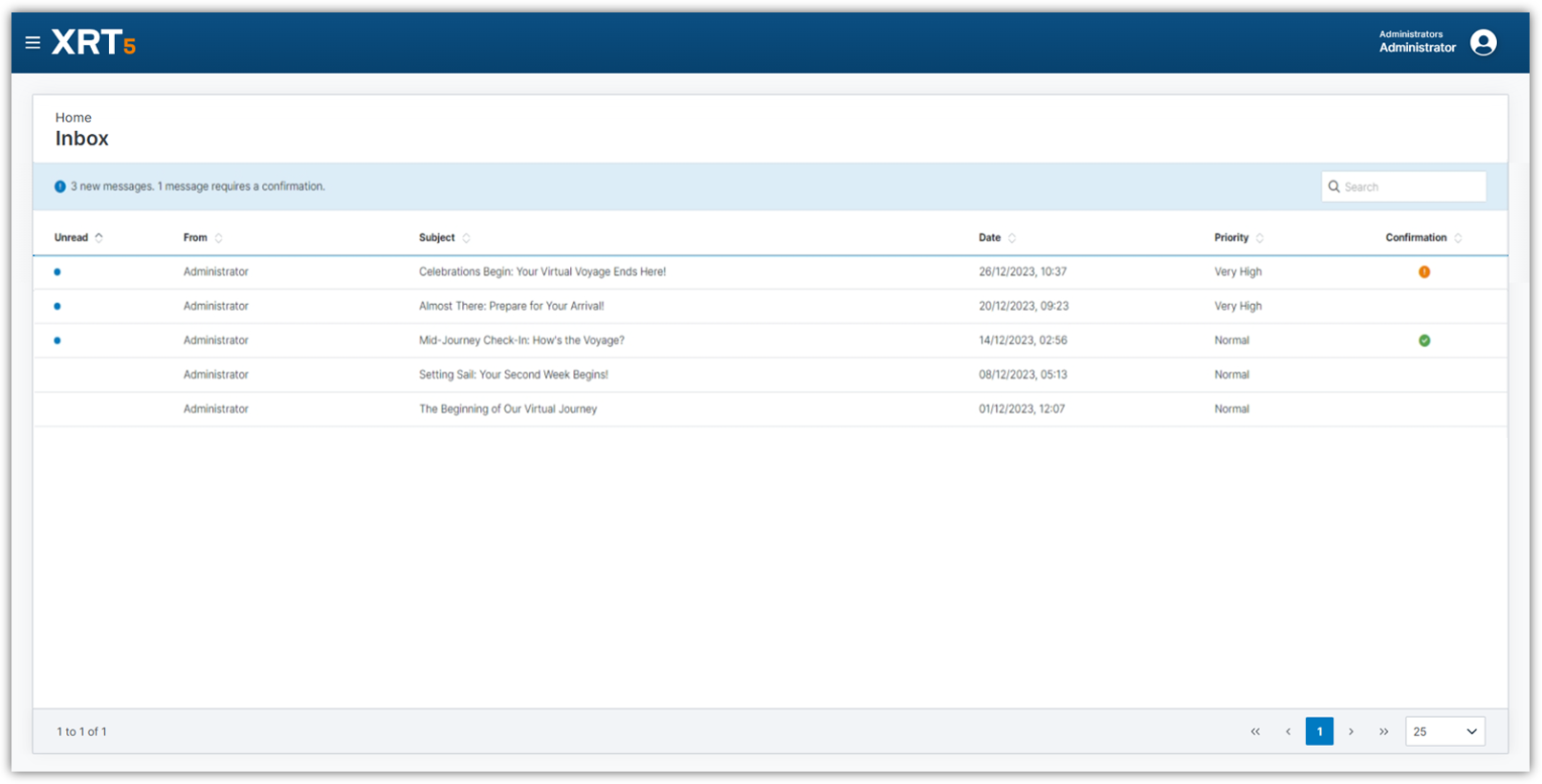
Reports
Depending on the role, a user sees more or less of the available reports in this overview. Along with the overview, the detailed view of the reports including filtering options have been adapted to the new design. However, no functionalities have been removed and all requirements to be compliant with data can still be fulfilled.
This is the new layout of all the reports from an administrator perspective. It shows all reports that are possibly available.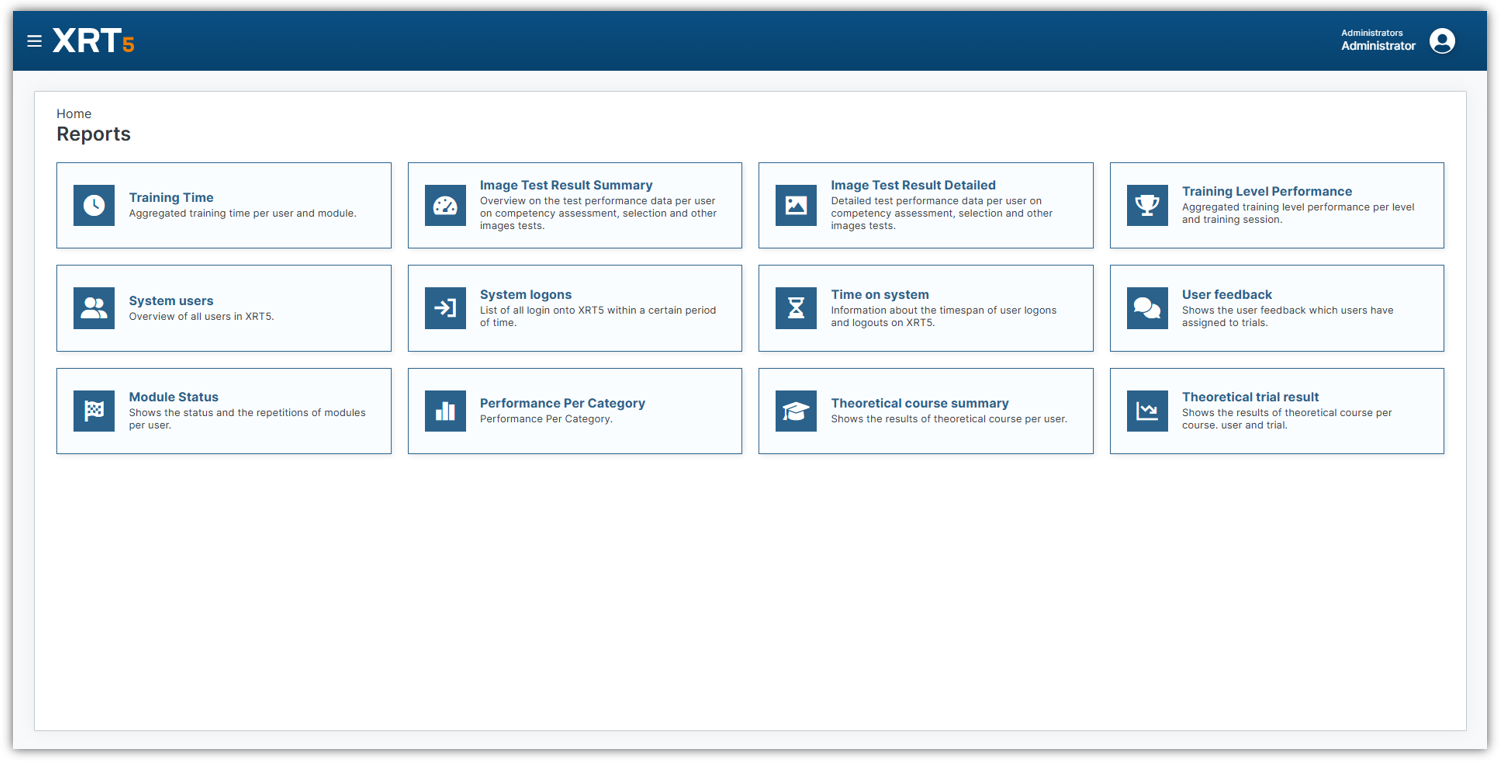
The filtering works slightly different than before. Instead of being placed on the left of the data (and with that taking away space on the screen) it is now accessible on the top of the data. Simply click the filter icon and fill in your parameters to get the required data.
Additionally, to the filtering there are more navigational icons available. The arrows up/down are used for sorting. In the third icon with the squares the columns settings can be changed: each column can either be displayed or hidden, and the entire order can be reordered to the user’s liking by drag-and-drop. The circle resets the settings. Use the Export button to get the filtered data in either Excel or PDF format.
Improvements and Bug Fixes
NEW
– Copyright now shows 2025
IMPROVED
– The trial user feedback reasons were simplified for an easier reasoning of the users as well a a more coherent evaluation and analysis. The new reasons are: Contains a forbidden object, Not visible or recognizable, Not forbidden, Good image, Other
– System requirements documentation has been updated to accommodate the latest changes. Please get in touch with customerrelations@casra.ch for more information.
– All names of modules, series, libraries and other content elements containing the old name “XRT4” were migrated the more generic naming “XRT”.
BUG FIXES
– A bug has been fixed where uploaded packages didn’t show any trials assigned to the library.
– A bug has been fixed where the “valid from” date was incorrect in certain cases upon new user creation.
– A bug has been fixed where infosheets were not displayed under certain circumstances.
– A bug has been fixed where a user that was created in a browser where the language wasn’t set to English, the user was unable to log in.
– A bug has been fixed where the export to Excel in the training level performance report wasn’t possible.
– A bug in the 3D simulator has been fixed where the “show object button” worked only when view is selected.
– Hotfix 3.0.1: A bug has been fixed where the IP restriction wasn’t working correctly.
– Hotfix 3.0.2: A bug has been fixed where packages didn’t show after the installation and wasn’t possible to install bigger packages.
– Hotfix 3.0.3: A bug has been fixed where theoretical block modules couldn’t be started.
– Hotfix 3.0.4: A bug has been fixed where XRT restarted if too many users were excluded in a report.
– Hotfix 3.0.4: A bug has been fixed where a page reload occurred causing administrators to lose their work.
Release 2.19.0
August 2024
Analogic Simulator
A new custom 3D simulator has been implemented for the Analogic ConneCT machines. It resembles the coloring and provides the image enhancements organic only, organic stripping, metal only, black and white, negative, low density and photo rendering. Additionally, within this simulator the user is able to draw alarm frames and extract laptop frames. The simulator also has the functionality of displaying surface rendered and photo rendered images and highlight IEDs in red. Please get in touch with your customers representative at CASRA for more information and access to gain use.
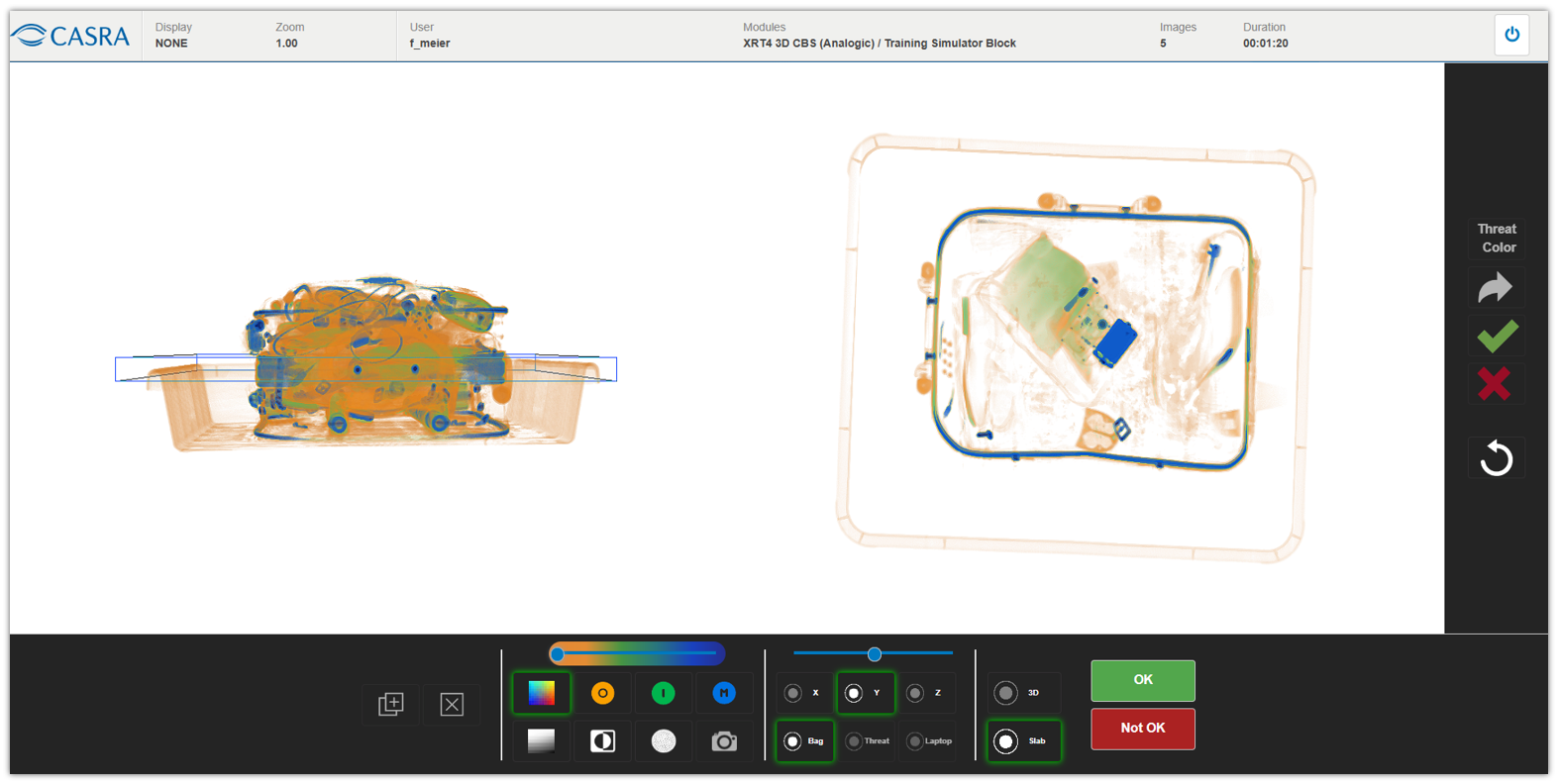
Default view in the Analogic simulator training
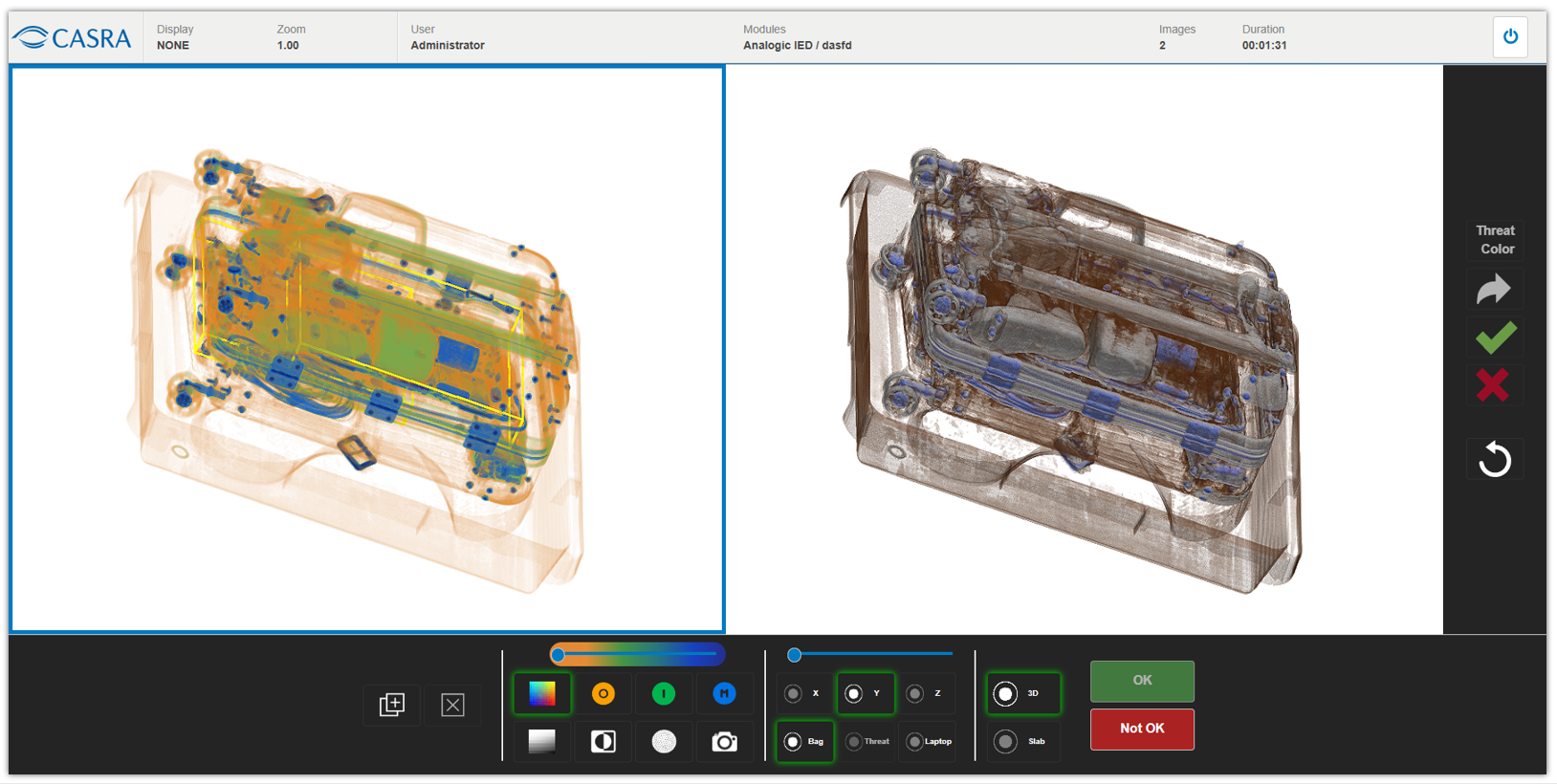
Surface rendered image in 3D
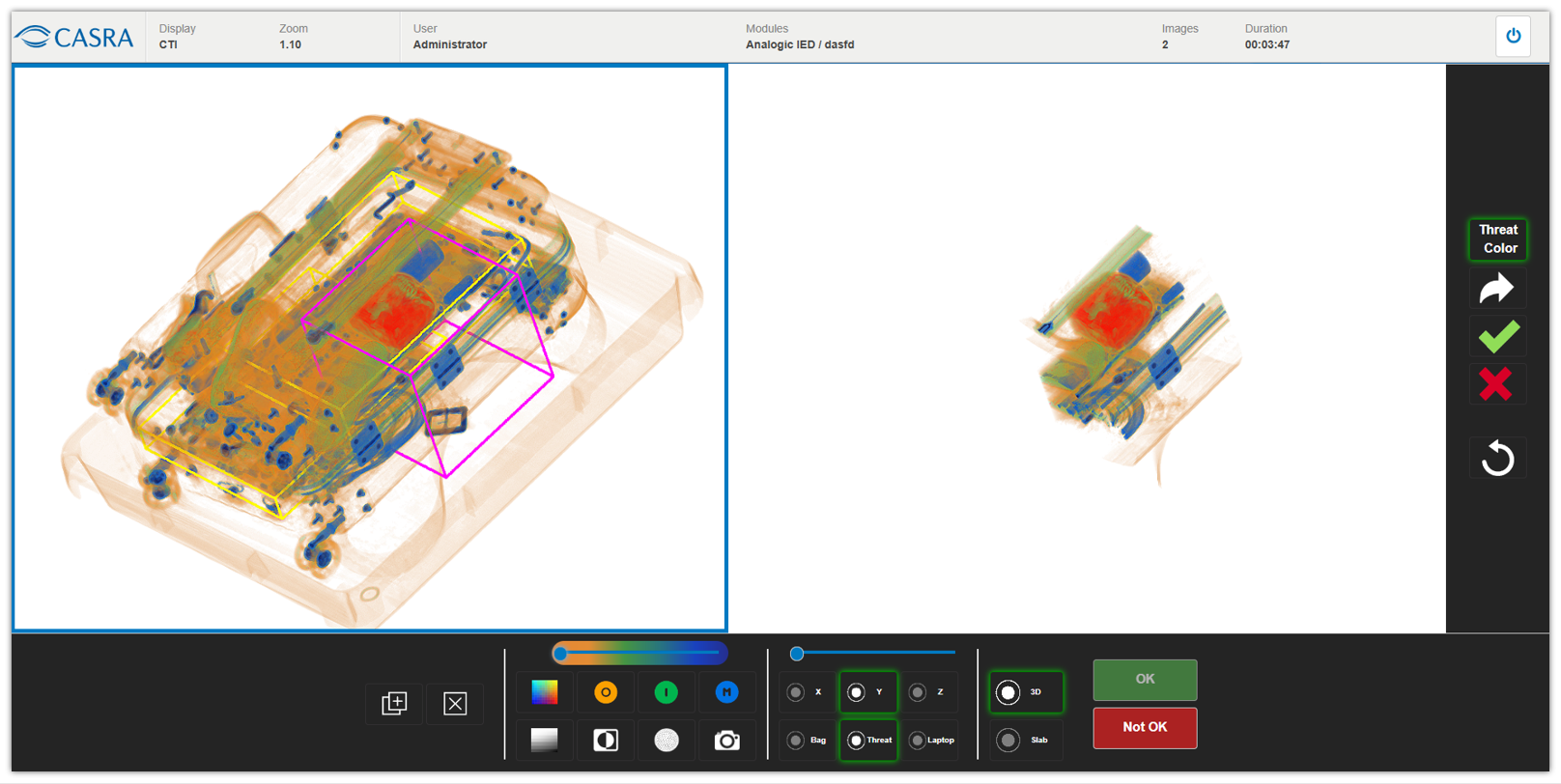
Red highlighted and surface rendered threat object
Improvements and Bug Fixes
NEW
– Image proxies can now be grouped together. This allows for modules to be assigned to these groups easily and they are then synchronized with all image proxies stored in this group. To make administration even easier, The user interface now enables the direct assignment to one or more image proxy groups from the module configuration
IMPROVED
– During a package import it is checked if there is a later (aka “newer”) version of a container. If there is one, the container won’t be imported.
– With the introduction of the new Analogic simulator, other simulators profited as well as the implementation used for the image enhancements in all 3D simulators was reworked and improved. This results in more realistic representation of the images in comparison with the real machines.
– Several updates of translations have been added in multiple languages.
Security
– The authentication cookie’s validity was reduced.
BUG FIXES
– A bug has been fixed where there was an incorrect display of certain edge case entries in the UI of the Training Time report that stemmed from trimmed data. The stored data that is also visible on the exports was never affected and always correct.
– A bug has been fixed where in the detail of 3D containers in the administration part, the zoom slider effect couldn’t be applied until clicking on the container..
Release 2.18.0
May 2024
Implementation of WCO HS code catalogue
For the custom high energy simulator the official World Custom Organization (WCO) harmonized system (HS) code catalogue was implemented. The user now sees the descriptions taken directly from chapter, heading and subheading in the simulator interface as they are imported from the official catalogue. The content is managed directly on the container (images) and is available in several languages. The code is divided into two-digits groups. The hierarchy goes from chapter to heading to subheading, meaning a total of six relevant digits. Anything following afterwards making the code longer is determined by localization and further specifics.
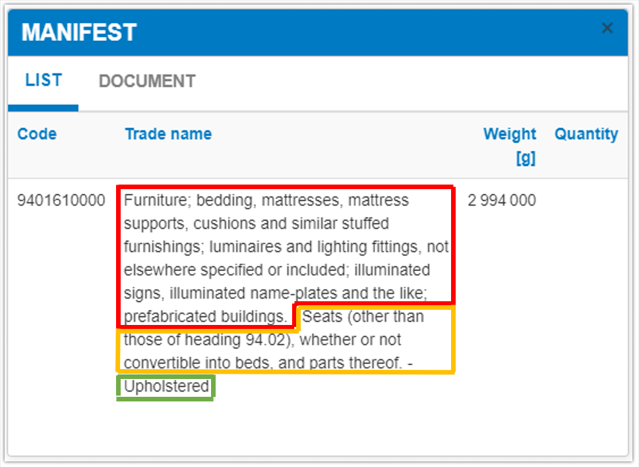
The official code in this example is 9401.61: Chapter (red): 94 – furniture; … then the heading (orange): 01 – Seats … and subheading (green): 61 – Upholstered. The following 0000 concludes to a specific definition that doesn’t have any official description anymore
Customizable label on reports on organization level
Due to authoritative regulations a customizable label can now be added on an organizational level. A label can be issued in text form and it can be localized to any languages required. Languages available in the software but with no localized report label will show the default settings. This label then will be printed automatically on any export of reports and it will also be displayed on the user interface. As this feature is directly linked to a change in the organization, please get in touch with the customer relation management team if you are interested in using customized labels in your reports.

Report label on the user interface

Report label on exported PDF document

Report label on exported Excel spreadsheet
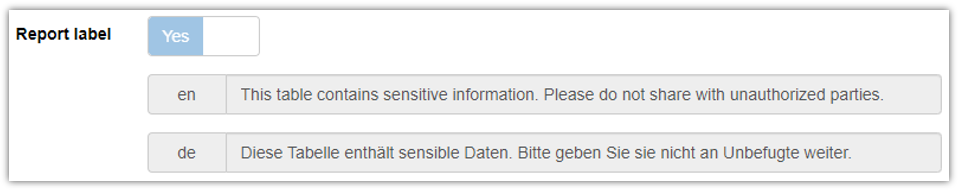
Localized report label on the organization
Improvements and Bug Fixes
NEW
– All instances where the term “waybill” was used were changed to consistently show “manifest” including all localizations.
– Manuals and quickguides are now also available in Spanish.
– The custom high energy simulator now comprises the full functions for the organic and inorganic image enhancement functions. This will be fully available after the content update.
IMPROVED
– The base canvas of the 3D simulator has been improved laying the foundation for further development in several simulators.
– The 3D simulators were updated to further enhance performance.
– Not sent out messages in the infoboard that remained in the draft state are not able to be hard deleted.
– Report settings are now able to be saved for all roles.
– The density slider on the Leidos simulator was set to a new default value matching the manufacturer machine more closely.
Security
– The X-frame options header has been added negating the risk of clickjacking.
– The risk of cross site scripting (XSS) has been reduced by making several API endpoints less vulnerable.
– Users with malicious intentions are no longer able to exploit a small part of the API.
BUG FIXES
– A bug has been fixed where the function “exclude obsolete level attempts” in the performance per category report was ignored when aggregating data per user.
– A bug has been fixed where no threat item marking was possible in 3D simulators after the time per image was exceeded.
– A bug has been fixed where disabling frames was not possible.
– A bug has been fixed in a faulty query in the performance per category report that resulted in an incorrect sum in the aggregation per user.
– A bug has been fixed where users with malicious intentions were able to exploit a small part of the API.
Release 2.17.0 and 2.17.1
May 2024
Improvements and Bug Fixes
NEW
– Implement Organic and inorganic image enhancement based on the gray scale image were implemented for the Customs High Energy simulator.
IMPROVED
– The 3D base canvas was reworked laying the foundation for several improvements of other simulators.
– The amount of failed login attempts is no longer set to a max. of 5 but can be set individually by the organization.
BUG FIXES
– Inconsistencies were corrected where months with 31 days resulted in incorrect data in the licenses and the displayed views in admin panel.
– A bug has been fixed where the 2D categorization during training was not evaluated correctly.
– A bug has been fixed where all the German reports showed a typo.
– A bug has been fixed in the reports where the user group filter didn’t work for groups without any data.
– A bug has been fixed for rounding errors in the Image Test Result Summary export
– A bug has been fixed where users in a suborganization were able to access reports of other organizations..
Release 2.16.0
March 2024
Improvements and Bug Fixes
NEW
– The Display Version GUID is now visible in the catalogue browser (relevant only for administrators).
IMPROVED
– There were several smaller improvements on the Leidos Simulator:
– Enabling the [+] button: it is always shown if the configurations of “show frames” AND “display frame button” are on.
– The categorization pop-up has been moved to the right panel for a better user experience.
– The slight delay when displaying the cropped view on the right has been eliminated.
– Multiple laptops can now be removed consecutively.
– The item boxes are now also visible in the feedback.
– The issues in the 3D training that were patched in 2.15.0 have been further improved.
– Whitespace characters are now automatically trimmed at the end of an entry while inserting users in the database.
– Further translations in various languages were added.
BUG FIXES
– A bug has been fixed where the UI was broken whenever there were more than two action buttons in the Morpho Simulator.
– A bug has been fixed where incorrect dates and decimal conversions in the Excel reports were displayed.
Release 2.15.0
NEW FEATURES
Laptop Separation
There is now the possibility to separate laptops in a bag. The laptops are marked in the XRT4 content as a special Region of Interest (ROI), indicated with a yellow frame. There is a specific button displayed on the bottom-left of the screen. Clicking this button removes the volume of a laptop in the container. The removed volume appears transparent, making it easier for the screener to identify possible threats.
This feature is currently only available for the 3D Leidos Simulator.
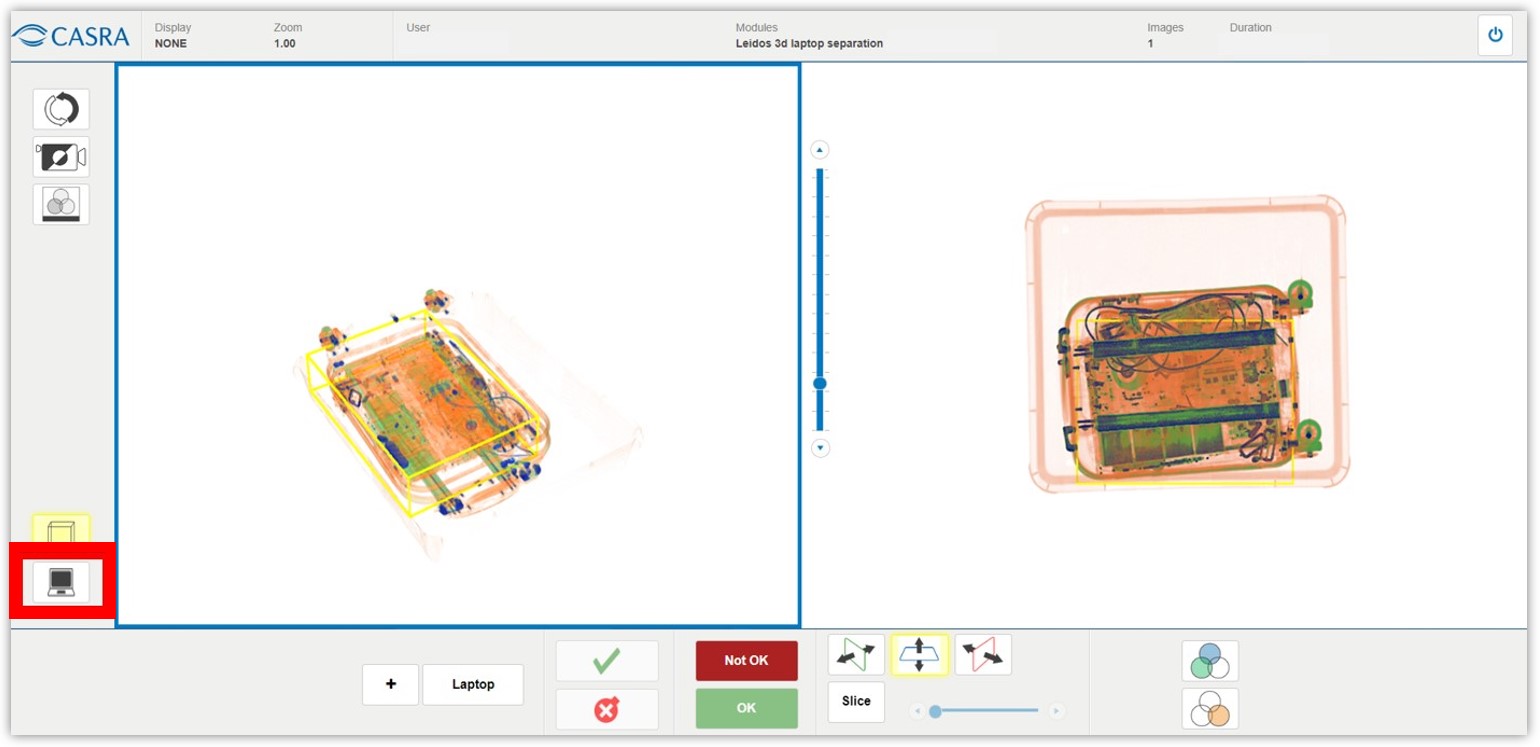
Leidos Simulator UI showing the ‘Laptop’ button.
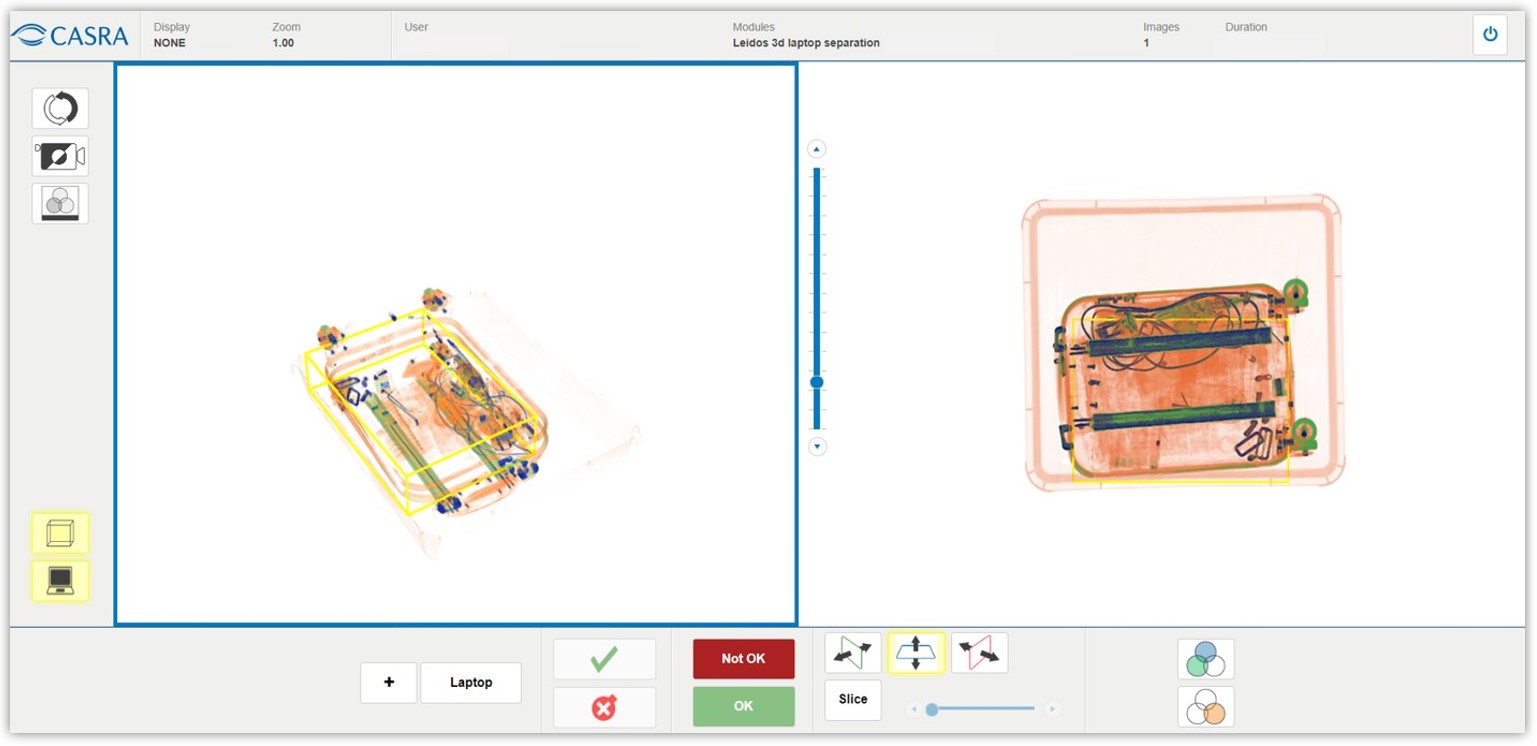
The volume of the laptop is removed, making the image appear more transparent.
New Simulator UI for Morpho Machines (CTX9800Dsi)
A new simulator for the Morpho CTX9800Dsi machines has been added to XRT4. Instead of simply coloring the X-Ray image in the usual fashion, this customized simulator renders surfaces in distinct colors: threat items (alarms) in red, metal objects in blue, organic material in yellow and metal objects in an item frame (i.e. a trigger) in green. The rest of the image stays in black and white..
Other mostly standard functions such as slicing (directions: from the front, left, right, top and bottom) and an opacity slider are also implemented, as well as image enhancements for organic stripping, organic only, sharpening and displaying the image in negative colors. Additionally, the user can navigate from one alarm to the next. The alarm resolution button crops the entire volume to the predefined box, activating the button to display a trigger.
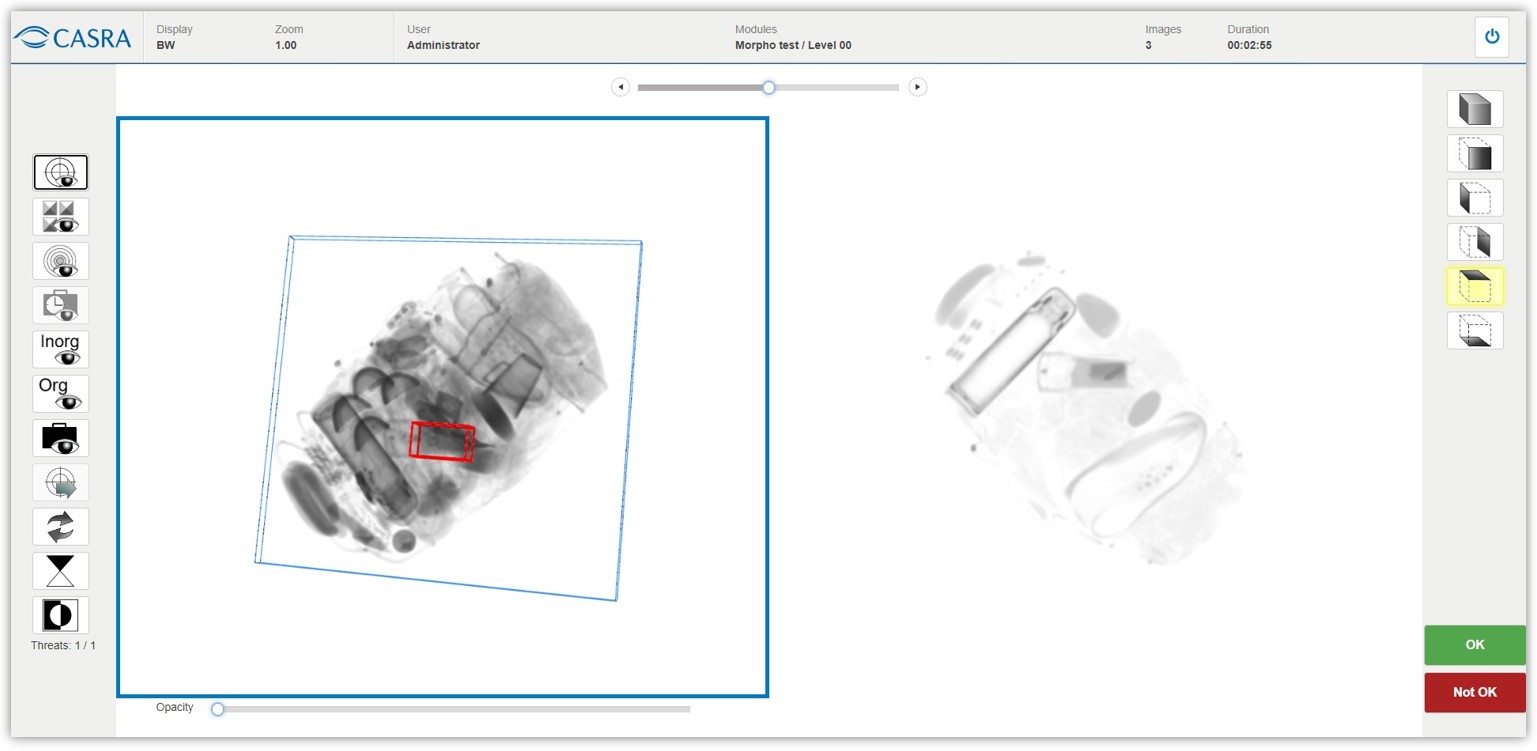
Morpho Simulator
Rendered Surfaces of the Morpho Simulator
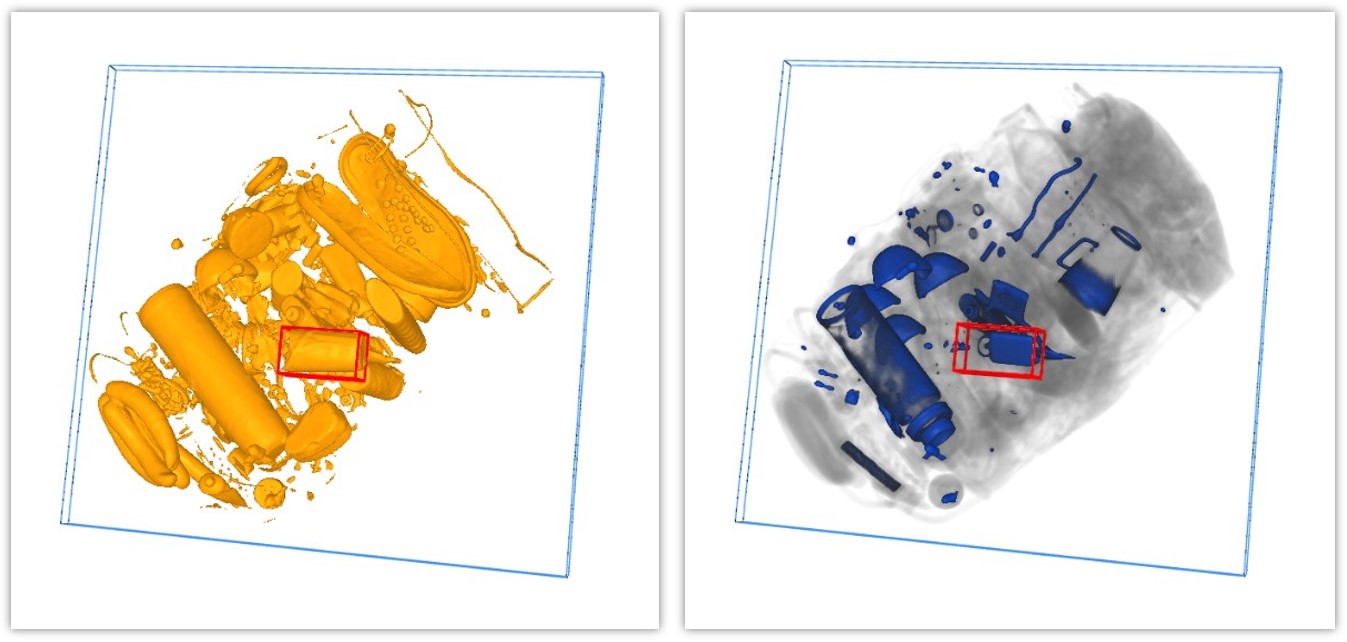
Rendered surfaces of the organic (yellow) and metallic (blue) material
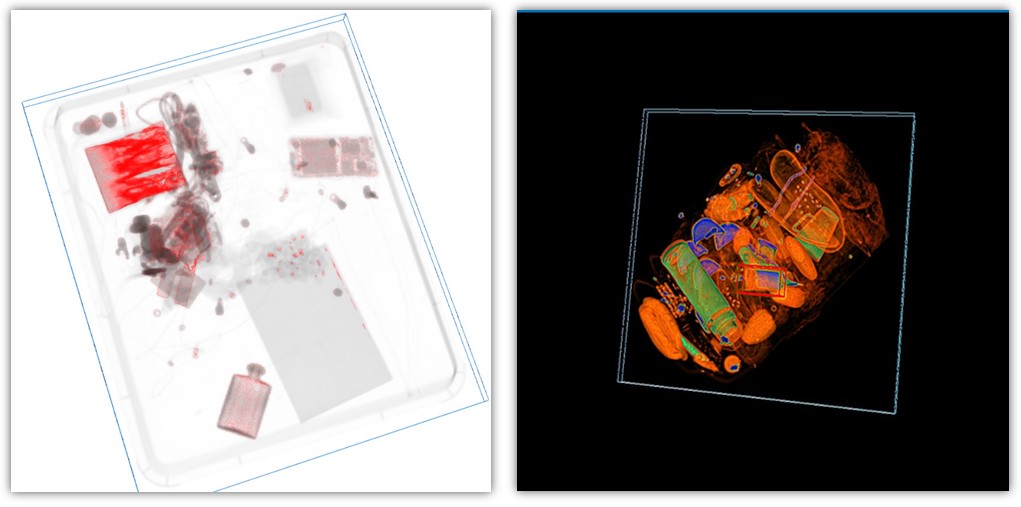
Rendered surface of possible explosive materials and enhanced colors displayed in negative.
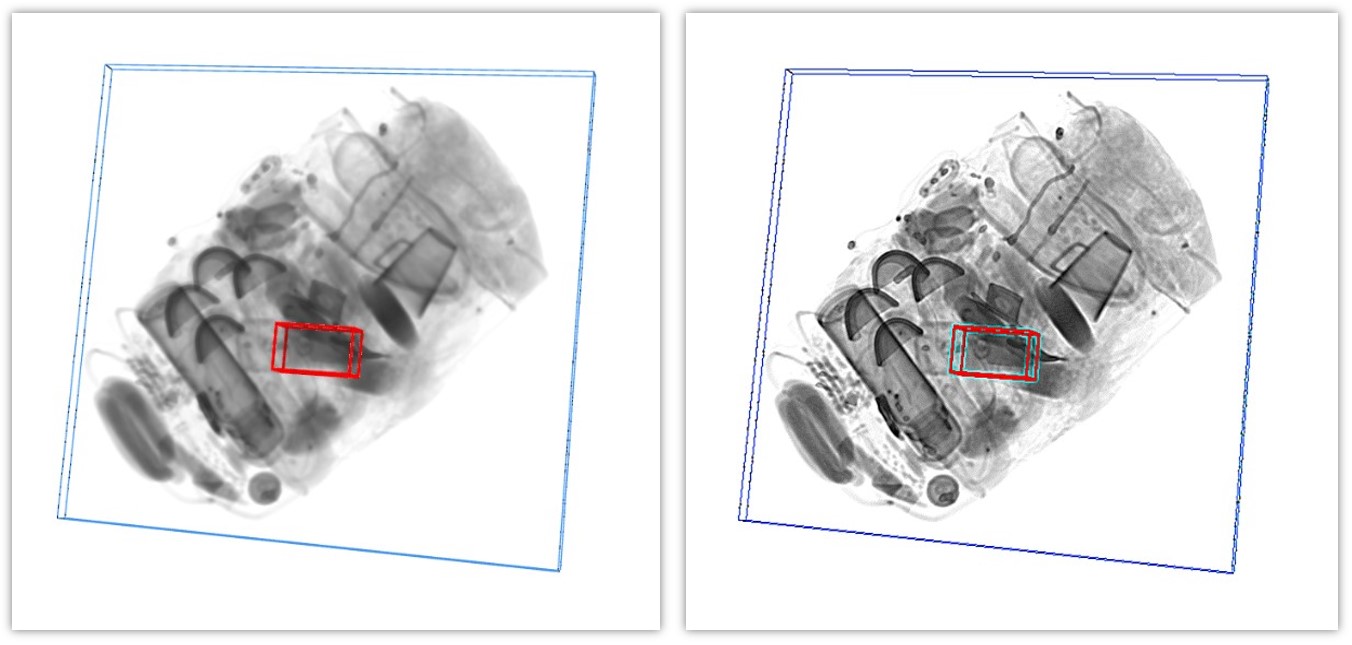
Default display in black and white (left) and the enhanced, sharpened image (right)
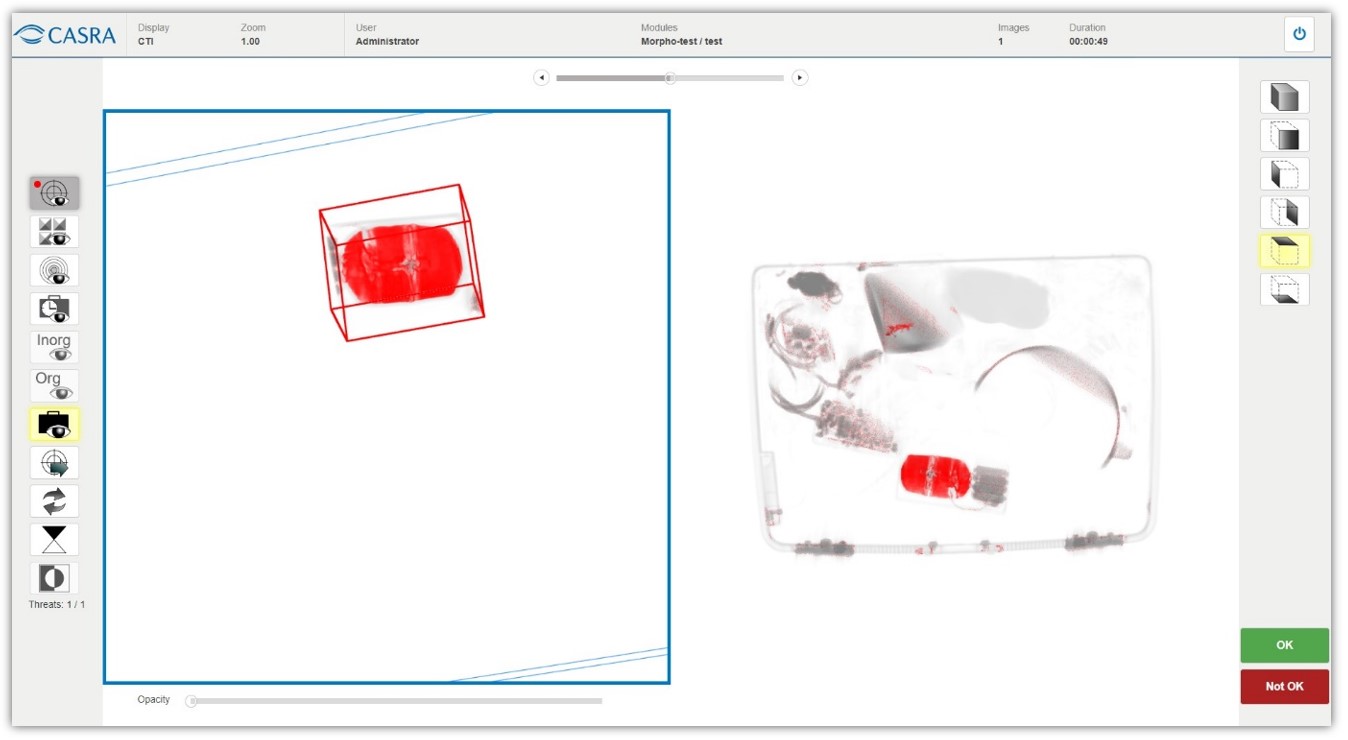
Morpho Simulator with the cropped view on the left view panel to display red surface rendered alarm substance..
On the right view panel the user sees the 2D view from the top.
Improvements and Bug Fixes
NEW
– The copyright and data protection have been adapted to the new year.
– The feedback reasons in the user’s trial feedback popup window were revised, the order changed and one additional reason was added.
IMPROVED
– Time differences between UTC and local time was improved in the Excel exports of the reports.
– The password policy was strengthened and now includes an extended set of special characters.
BUG FIXES
– A bug has been fixed where the course title filter didn’t work in the course content browser.
– Issues when moving specific users in progress control have been fixed.
– A bug has been fixed where the feedback popup was shown in 3D simulator and the frame button was cropping the wrong frames.
– Incorrect filter options in the Series User Assignment have been fixed.
– Several enduring issues concerning 3D training have been patched. These fixes prevent crashes during longer training sessions especially on weaker hardware.
Release 2.14.0 and 2.14.1
August 2023
NEW FEATURES
Extension of the Leidos Simulator UI
The Leidos Simulator UI has been extend to include the feature of user initiated bounding boxes. Using the new functionality (” + ” button) in the interface users can now draw boxes in the 3D image marking (possible) threat objects themselves. The items need to be categorized using the established list of threat types.
The boxes can be selected and then viewed on the righthand side of the screen in a cropped 3D version for closer inspection. Each of these self-created alarms has to be cleared. This is achieved be either marking it as harmless (green tick icon) or dangerous (red bomb icon). Only when all of the self-drawn boxes are cleared, the simulator lets the user finish evaluating the trials as OK (all alarms are harmless) or Not OK (certain alarms were marked as dangerous). If the user in fact detects a dangerous object, its position has to be marked before the evaluation is completed.
This feature has been implemented especially for training purposes of Leidos users.
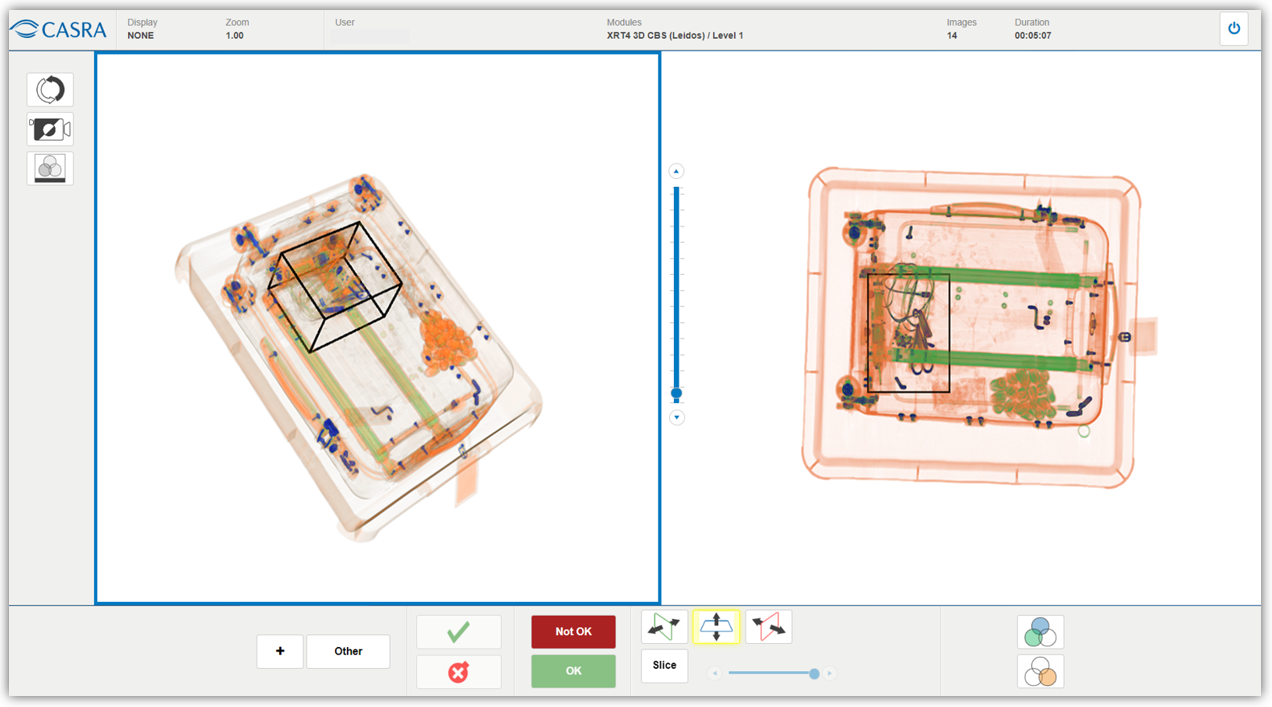
Leidos Simulator UI showing a user-drawn box in black containing a dangerous object (pair of scissors; category: other).
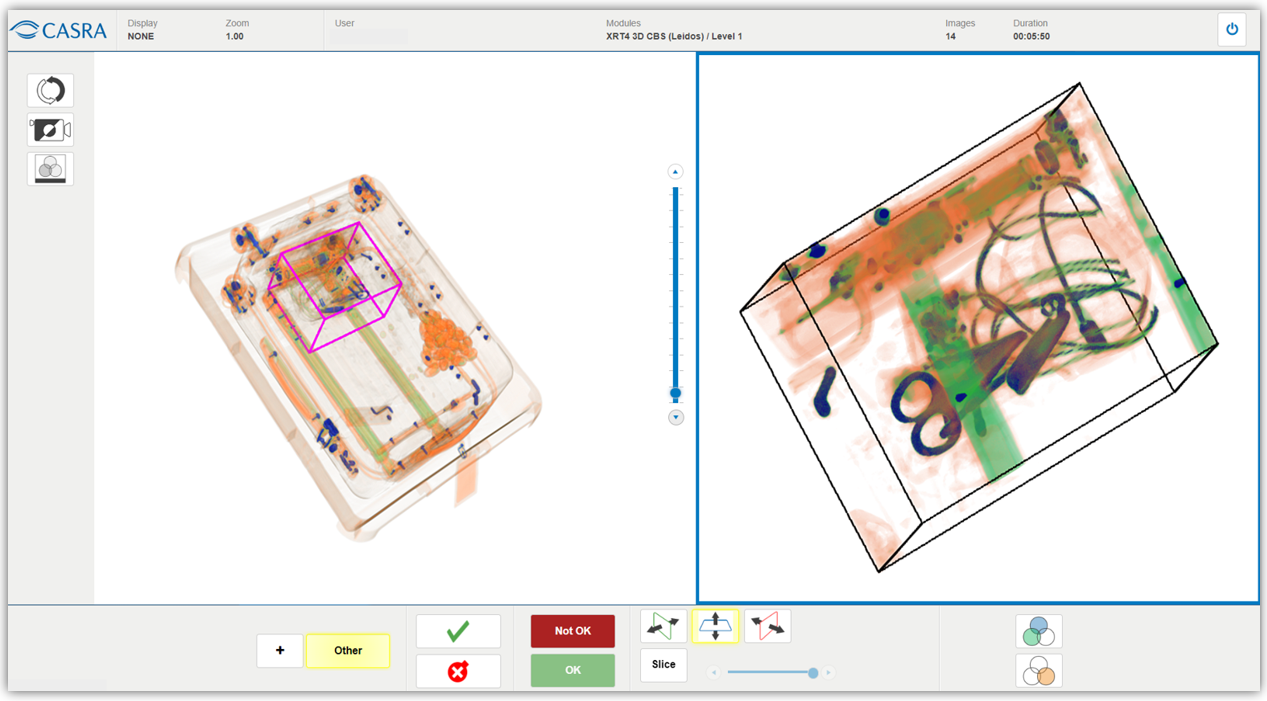
The alarm box is selected on the left (pink box; button “other” highlighted in yellow) which results in the 3D cropped image on the right.
Improvements and Bug Fixes
NEW
– It is now possible to have a leaner, more reduced test and certification result feedback (module run feedback) that can be activated by applying the manual module feedback settings.
IMPROVED
– Several updates on the Active Directory have been integrated, i.e. the users role is now updated during the Active Directory synchronization.
– Styling files have been updated in order to ensure the correct display in the frontend after a new version was released.
– The Leidos density slider has been adapted to a more granular use now featuring a finer scale. Furthermore the default setting has been adapted to a denser value which reflects a more realistic depiction of the image.
– A data reorganization has been implemented resulting in a better performance while simultaneously saving data storage.
– The running of the user purging has been improved, reducing performance issues for training and test.
BUG FIXES
BUGFIXES FOR 2.14.0
– A bug has been fixed where the series module assignment crashed if a module was missing its description.
– A bug has been fixed where certain modules under rare circumstances were not set to ‘completed’ even if all trials have been seen.
– A bug has been fixed where the category filter in the trial browser did not work.
– A bug has been fixed where an incorrect success message was displayed after the import of a specific module version update that was not carried out in the background.
– Discrepancies between the user interface and the Excel export of the Training Time Report that were due to the fact of inconsistencies of UTC and displayed local time have been fixed.
– A bug has been fixed for the time aggregation in the Training Time report.
– A bug has been fixed which prevented the progress in the administration of the series module assignment when the module was missing the description.
BUGFIXES FOR 2.14.1
– A bug has been fixed that prevented user groups from being created in certain organizations.
– A bug has been fixed where the performance was too slow due to a low bandwidth if modules were run using an image proxy.
– A bug has been fixed where the fallback language of Infosheets has been set incorrectly.
– A bug has been fixed correcting Infosheet issues after releasing the new Infosheet package version.
– A bug has been fixed where the image proxy ran into a timeout for large files.
Release 2.13.0 and 2.13.1
August 2023
NEW FEATURES
Module Run Order by User Decision
In the Series configuration there is a new option for the module order called ‘user selection’. When activated this feature lets the user decide in what order they want to complete the assigned modules. This results in a dedicated button for each module indicating the start on the home screen. The icons in the front show the different states in which the modules are in (i.e. module in progress, pristine, passed, failed) making it easy for the user to continue the work.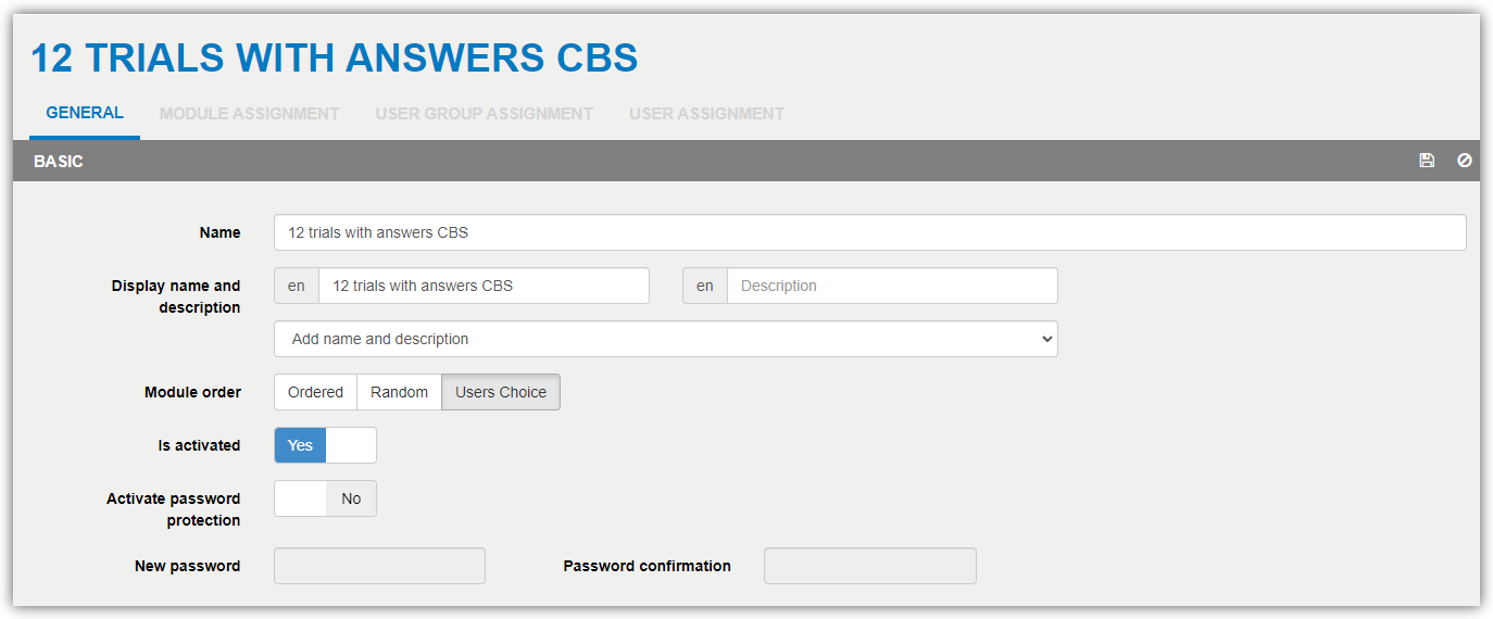
Translations Update and Adding of 6 New Languages
The multilingual setup has been adapted in order to make changes to inconsistent or missing translations easier. Apart from the standard Latin characters including special characters like ä, ö, ü, ł, å, etc. and all accents (é, ô, à, etc.), XRT4 is able to handle the Cyrillic alphabet (Русский, Українська, and others), Hindi (हिन्दी) and even Arabic (عربى) which is running from right to left.
With this release 6 new languages have been added (Albanian, Macedonian, Russian, Ukrainian, Serbian and Portuguese) bringing the number of available languages to a grand total of 21 languages. The most used languages are English, German, French, Polish, Italian, Swedish and Spanish. Let us know if your desired language is not available yet and we’ll check the feasibility to add it.
Improvements and Bug Fixes
NEW
– It is now possible to have a leaner, more reduced test and certification result feedback (module run feedback) that can be activated by applying the manual module feedback settings.
IMPROVED
– Several updates on the Active Directory have been integrated, i.e. the users role is now updated during the Active Directory synchronization.
– Styling files have been updated in order to ensure the correct display in the frontend after a new version was released.
– The Leidos density slider has been adapted to a more granular use now featuring a finer scale. Furthermore the default setting has been adapted to a denser value which reflects a more realistic depiction of the image.
– A data reorganization has been implemented resulting in a better performance while simultaneously saving data storage.
– The running of the user purging has been improved, reducing performance issues for training and test.
BUG FIXES
BUGFIXES FOR 2.13.0
– A bug has been fixed where the series module assignment crashed if a module was missing its description.
– A bug has been fixed where certain modules under rare circumstances were not set to ‘completed’ even if all trials have been seen.
– A bug has been fixed where the category filter in the trial browser did not work.
– A bug has been fixed where an incorrect success message was displayed after the import of a specific module version update that was not carried out in the background.
– Discrepancies between the user interface and the Excel export of the Training Time Report that were due to the fact of inconsistencies of UTC and displayed local time have been fixed.
– A bug has been fixed for the time aggregation in the Training Time report.
– A bug has been fixed which prevented the progress in the administration of the series module assignment when the module was missing the description.
BUGFIXES FOR 2.13.1
– A bug has been fixed that prevented user groups from being created in certain organizations.
– A bug has been fixed where the performance was too slow due to a low bandwidth if modules were run using an image proxy.
– A bug has been fixed where the fallback language of Infosheets has been set incorrectly.
– A bug has been fixed correcting Infosheet issues after releasing the new Infosheet package version.
– A bug has been fixed where the image proxy ran into a timeout for large files.
Release 2.12.0 and Hotfix 2.12.1
July 2023
NEW FEATURES
Theoretical Block Synchronization
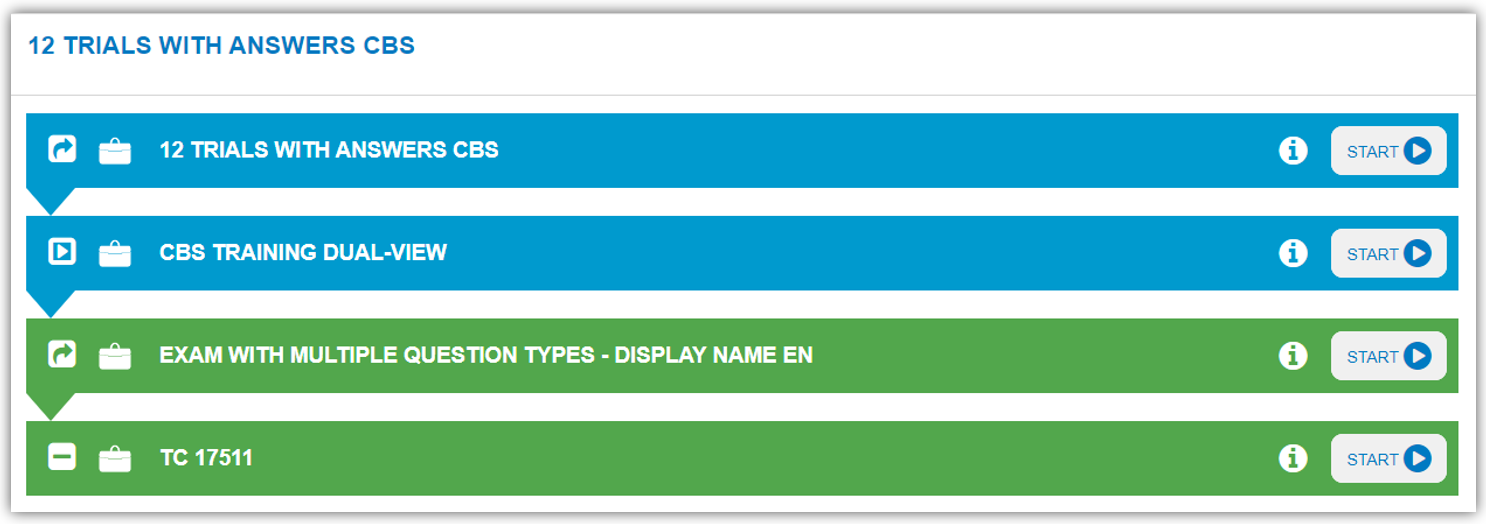
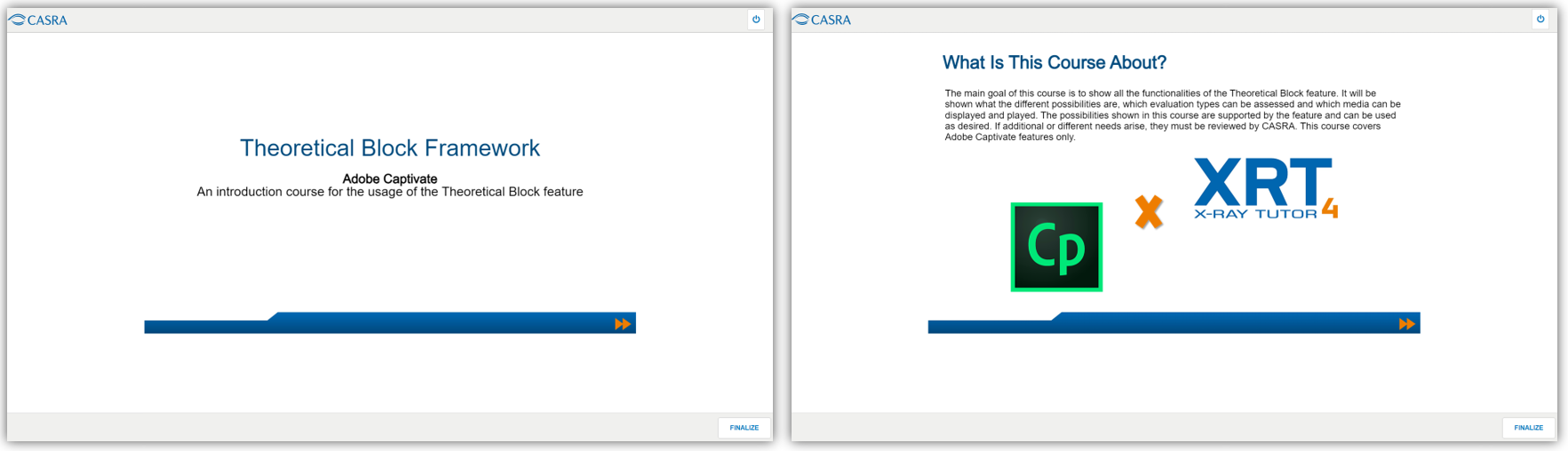
XRT4 now provides a functionality to define, execute and evaluate a theoretical exam as an addition to the image interpretation test. It is meant to run e-Learning modules used by XRT4 customers. Theoretical Blocks can be issued individually using an authoring tool. We evaluated and support Captivate by Adobe. By using this program, CASRA can guarantee the transfer of the data to XRT4 as well as the calculation of test results and report times. Theoretical Blocks can be setup, issued and maintained by Administrators or as a service by CASRA.
This feature is available to all Expert License holders. If you are interested in using it, please get in touch with one of our customer relationship managers (customerrelations@casra.ch).
XRT4 now provides…
Improvements and Bug Fixes
NEW
– IOI frame color in Customs HE simulator are now consistently visible in red
IMPROVED
– The session feedback now shows the correct count after a previous discrepancy with customized validation buttons.
– Shared Trials Follow-Up: During a long maintenance window all simulator trial runs were purged. Trials from deprecated modules were deleted and the library updates on all sub modules triggered. Libraries on master modules were updated.
– In order to determine the state of a user XRT4 uses the component SignalR. It detects whether a client is still connected to the server or not, but it has been shown, that under certain, rarely occurring circumstances, the state of the client cannot be determined correctly (e.g. incorrectly ending the training with subsequent minimization of the browser, etc.). Such circumstances can cause that the server has the impression that the user is still executing a training session, even though they have already left the workplace. We have already analysed the data a first time and found that only about 0.15% of all training sessions per day are affected. Triggers and reasons for such misconduct are difficult to determine and can be very complex. Nevertheless, with the latest releases of XRT4, we were able to close many of these gaps through suitable measures. However, it is still recommended to instruct users to end the training sessions correctly, i.e. by not simply closing the browser or leaving the workstation, but go the correct way by pressing the ‘Exit’ button and confirming the feedbacks. Please do not hesitate to get in touch with CASRA if you experience discrepancies of any kind.
BUG FIXES
BUG FIXES FOR 2.12.0
– When creating a new module in the simulator, a busy indicator is visible during the loading time in order to avoid an empty dropdown until the available options are shown.
– Trials in the module with library auto-update turned on are now deleted and/or deprecated after deletion/update.
– The UI crashes no longer and the session is not aborted anymore after a user starts a series with certain Customs simulator modules.
– The correction of a culture setting error on the server settings is now returning the correct evaluation of position markers of FTIs.
BUG FIXES FOR 2.12.1
– The browser feedback pop-up message popping up for general users in certain specific modules was corrected.
– Multi-FTI only now displays all allocated infosheet in the feedback.
– Incorrect and overly large styling of the displayed feedback is now in accordance to the screensize.
Release 2.11.1
April 2023
NEW FEATURES
3D CBS Leidos Simulator
XRT4 has now a generic process implemented to handle view-port specific image-enhancements. These image enhancement functions can be used to change the presentation of the images. Several individual image enhancement functions have been modified and improved which shows for example in the coloring of the images.
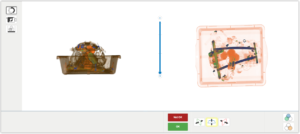
Additionally, a new density slider has been introduced in the UI. The vertical bar in the middle of the two view-ports allows the screener to display the image in either a denser or lighter color scheme, allowing a more accurate decision in regards to threat items.
Density set at 100% and 80% respectively
Leidos 3D Simulator UI
Performance Improvements of Reports
The growing volumes of data have a further ongoing impact on performance of the reports. For this reason, the performance has been revised for some reports again. The loading times of the reports were significantly improved by the revision.
Of the various reports that XRT4 provides, the ones highlighted in bold have been improved in their performance:
– Training Time
– Image Test Result Summary
– Image Test Result Detailed
– Training Level Performance
– Module Status
– Performance per Category
– Theoretical Course Summary
– Theoretical Trial Result
Improvements and Bug Fixes
NEW
– 3D CBS Leidos Simulator: improved image enhancement functions and implementation of new density slider.
– Performance of various reports have been improved due to the growing volume of data.
– A new Region of Interest Type for Marked Objects can now be displayed in all Simulators.
IMPROVED
– The purging of users has been optimized in order to delete a user.
– The various test reports have been improved so that the result is displayed as “In progress” if the user has not yet seen all the images.
– Several adaptations have been implemented in order to calculate the time and duration more accurately if a training session was not completed properly.
BUG FIXES
– A bug has been fixed where the low luminosity button was not highlighted in the generic customs simulator UI.
– Minor problems with translations have been fixed.
– A bug has been fixed where existing birthdays were deleted after using specific functions.
– A bug has been fixed where it was only possible to store an A’ passmark with one digit after the comma.
– A bug has been fixed that blocked the continue button and left the user unable to continue after reaching feedback timeout on Theoretical Course Feedback.
– A bug has been fixed where it was not possible to restrict user access to reports.
– A bug has been fixed where it was not possible anymore to reset the position marker in any 3D simulator after setting it once if there was categorization enabled.
– A bug has been fixed where the Half-Year Tab in the Training Dashboard showed the wrong period.